Document templates
Overview
Pursuit document templates are team-level Word-style layouts with variable placeholders — company name, VAT, pursuit title, banking fields, and more. Generate consistent offer documents inside pursuits without rebuilding headers and legal blocks every time.
Templates live at team level; generated files land in each pursuit's Documents library. Variables resolve from Team settings and pursuit context at generation time.
Tip: Before first live generation, confirm you have:
Completed Company profile, Legal representative, Banking
One template per document type your authorities expect
Test-generated from a sandbox pursuit
Correct language on template metadata
Editor connection healthy (OnlyOffice / collaborative driver)
Caution: Templates do not auto-update already-exported PDFs — regenerate after template or settings changes.
How to open
List page layout
Header
New button (+) → create flow.
Template grid
Each entry shows:
Template icon (by document kind)
Name and metadata
Hover cog or right-click context menu
Entry actions
States
Creating a template — numbered steps
Knowledge → Document templates → New.
Enter template name and description.
Choose language.
Pick creation mode: blank document vs. upload starter file.
Select document kind / engine.
Submit — editor page opens for variable placement.
Drag variables from catalog into document body.
Save metadata and document content.
Template editor
Variables examples: Company Name, Company VAT Code, pursuit fields — resolved at generation.
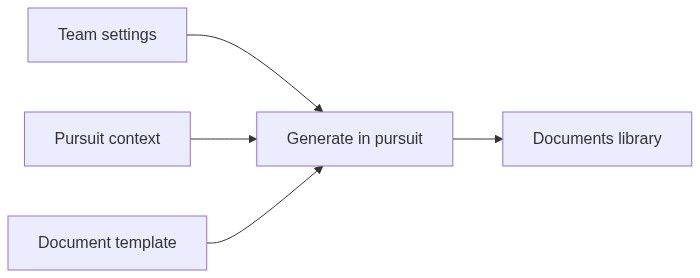
Using templates in pursuits
Open pursuit Documents module.
New document from template.
Select team template.
Document setup maps pursuit-specific values.
Generated file appears in library.
Open Document editor for final edits.
Missing settings → "complete" placeholders — finish settings first.
Relationship to other knowledge
Country and pursuit type
Create separate templates per language/country profile. Pursuit overview country configuration drives which pursuit modules appear — templates are team-wide but generation happens per pursuit.
Permissions
List: knowledge access. Create/edit/delete: often administrator role.
Best practices
One template per authority-expected doc type (technical annex, financial cover, etc.)
Use variables — never hard-code legal names in template body
Sandbox pursuit test before deadline week
Version major layout changes as new template; old pursuits keep prior outputs
Pair with Content library for narrative inside generated shells
Edge cases
FAQ
Do templates auto-update old PDFs?
No. Regenerate documents.
Templates per country?
Recommended — separate files per locale/profile.
Works standard forms vs templates?
Works uses Construction standard forms country catalog — templates for custom team layouts.
OnlyOffice required?
Editor driver typically OnlyOffice for DOCX.
Delete template in use?
Old generated files remain; new generation blocked for deleted template.
Share across teams?
No — team-scoped like all knowledge.
Related articles
Company profile
Content library
Documents library
Document editor
Create standalone pursuit
Was this helpful?
Still need help? Ask the team