Final checkup
Overview
Final checkup is the pre-submission review dashboard. It scans active pursuit modules for blocking issues, shows completion progress, and provides section navigation with deep links to fix problems — your last gate before packaging the bid and uploading to the authority portal.
Submission to the buyer still happens outside Tendersight. This module validates workspace readiness, not portal upload success.
Tip: At least one week before deadline, confirm you have:
Zero red issue badges in section navigation
Re-opened checkup after any major edit (report does not auto-refresh in background)
Downloaded works construction archive and opened locally (works pursuits)
Team sign-off on questionnaire statuses and financial total
Kanban card ready to move to Bid submitted after external upload
Important: Informational issues (e.g. empty win themes) may not block — destructive/red items do.
When this module appears
Report includes only modules active for your type × country configuration.
How to open
Layout
Two-column: sticky navigation (left), scrollable report (right).
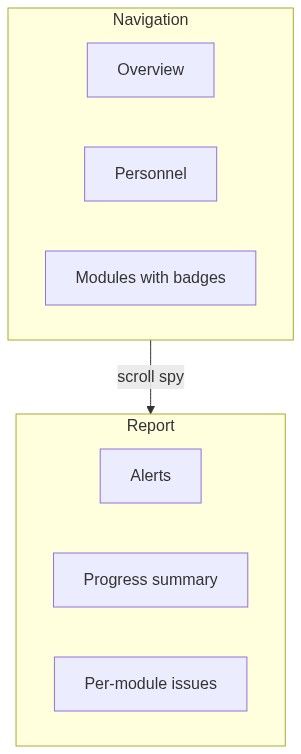
Section navigation
Issue labels use destructive styling.
Report blocks
What final checkup evaluates
Dynamic per active modules:
Exact checks from country configuration resolver.
Key actions
Pre-submission workflow
```mermaid
flowchart LR
FC[Final checkup]
FIX[Fix in modules]
ZERO[Zero badges]
SUB[External submit]
FC -->|issues| FIX
FIX --> FC
FC -->|clear| ZERO
ZERO --> SUB
```
Numbered workflow — clearance pass
Open final checkup fresh (hard refresh if long session).
Fix context alert first on overview.
Work navigation top to bottom — click each red badge module.
Resolve issues via deep links.
Return to checkup — repeat until badges clear.
Works: download archive; verify file list.
External portal upload.
Team → Pursuits → Bid submitted.
Empty and processing states
Downstream role
Terminal aggregator — reads all modules; nothing depends on checkup data. Progress may sync to Overview on load.
Edge cases
FAQ
Does checkup submit to authority?
No. External portal only.
Auto-refresh?
No — reopen page after fixes.
Yellow vs red issues?
Red counts block readiness in navigation badges.
Can I waive an issue?
No — fix or change data in source module.
Archive contents?
Generated docs per works profile — verify locally.
Multiple reviewers?
Share pursuit; each fixes assigned modules.
Related articles
Pursuit overview
Questionnaire
Technical offer
Financial offer
Construction standard forms
Documents library
First pursuit workflow
Was this helpful?
Still need help? Ask the team