Contracting authorities directory
Overview
The Contracting authorities directory lists public buyers — ministries, municipalities, hospitals, utilities, and agencies — with links to their notice history and procurement statistics. Research how a buyer publishes, what they buy, and who wins before you invest in a pursuit on Team → Pursuits.
Authority records are read-only market intelligence synced from official publications. You cannot edit buyer names or notice counts. When your pursuit needs the correct authority spelling, look it up here before Create standalone pursuit.
Tip: Before account planning on a major buyer, confirm you have:
Searched by official name variants (abbreviations differ by source)
Filtered by country to avoid homonym authorities
Opened Statistics for seasonality and CPV mix
Cross-checked active tenders on Tenders tab vs. Alerts rules
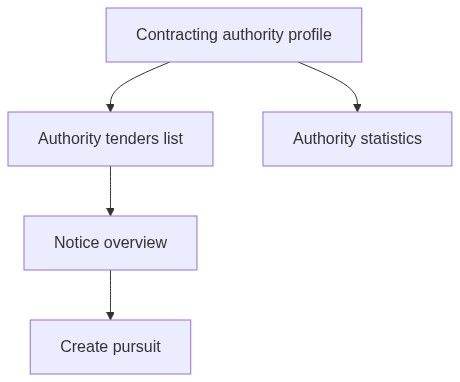
Important: Directory analytics do not replace Notice overview for submission deadlines and document downloads. Always open the individual notice before Create pursuit.
Authority vs notice vs pursuit
How to open
Page layout
Search and filters
Filters update after you pause typing.
Directory list
Each row typically shows:
States
Pagination syncs to URL ?page= for sharing.
Authority profile tabs
Click a row to open the profile:
Default landing tab is often Tenders or Overview depending on build — use tab bar to switch.
Numbered workflow — new buyer evaluation
Analytics → Contracting authorities → search buyer legal name.
Open profile → Statistics tab.
Set year and currency on header controls.
Review Seasonality — plan bid capacity for busy months.
Breakdown tab — note supplies vs. works mix.
Companies tab — identify incumbents.
Tenders tab — filter Ongoing notices.
Open promising notice → Create pursuit if bid/no-bid is go.
Numbered workflow — validate standalone pursuit authority
Use when the tender is not in the catalog.
Search directory for official buyer name.
Copy exact spelling into standalone pursuit wizard Contracting authority field.
Optional: note historical CPV focus from Statistics for internal brief.
Upload tender PDFs to pursuit documents — no automatic link to authority record on standalone.
Caution: Standalone pursuits do not auto-link to authority analytics. Prefer notice-backed pursuits when the tender is indexed.
Use in pursuits (notice-backed)
Changing authority text on Pursuit overview does not change directory or notice records.
Relationship to alerts
Configure Opportunities → Alerts with authority filters informed by directory research. Alerts fire on new notices; directory shows historical behavior.
Permissions
Edge cases
What you cannot do
Edit authority registry data
Register a new buyer manually
Create pursuit from directory without opening a notice
See unpublished draft tenders (only synced publications)
Recommended reading order
Contracting authority (entity)
This directory — find buyer
Authority statistics — behavior
Authority tenders — active opportunities
Notice overview — actionable detail
First pursuit workflow
FAQ
How is this different from notice contracting authority field?
The field on a notice points to one publication's buyer. The directory aggregates all that buyer's notices.
Can I see authorities outside my country?
Yes — use country filter or search; data depends on Tendersight source coverage.
Why does authority statistics differ from market statistics?
Market statistics is national aggregates; authority statistics is one buyer deep dive.
Do alerts use directory IDs?
Alerts use notice criteria (keywords, CPV, country); authority may be a filter dimension depending on ruleset setup.
Can two teams share authority research?
Directory is shared read-only across customers; pursuits remain per-team private.
How do I report wrong authority data?
You cannot edit — wait for source correction on sync or contact support with notice identifier.
Related articles
Contracting authority (entity)
Authority tenders
Authority statistics
Browse notices
Notice (Tender)
Market statistics
Was this helpful?
Still need help? Ask the team