Authority statistics
Overview
Authority statistics analyzes how a contracting authority buys — publication rhythms, CPV and procedure mix, competition intensity, award patterns, top suppliers, and long-term trends. Use it to tailor bid strategy, staffing plans, and pricing posture for a specific buyer before you open Authority tenders or Create pursuit on individual notices.
Data aggregates many notices from synced official sources. It is read-only and refreshes on Tendersight's import schedule — not live portal data.
Tip: Before a quarterly account review on a major buyer, confirm you have:
Set year (or all-years) and currency on header controls
Noted as of snapshot date on KPI cards
Opened each chart's formula tooltip before citing metrics externally
Cross-checked one ongoing tender on Tenders tab for real deadlines
Compared incumbents on Companies tab with Company statistics
Caution: Statistics describe historical behavior. A buyer can change procedure rules or evaluation weights — read current tender documents in your pursuit, not only last year's charts.
Statistics vs tenders tab
How to open
URL supports ?tab=breakdown|trends|companies (or similar) — tab syncs to browser history for deep links.
Header controls
Summary KPI section loads below controls before tab content.
Summary section (always visible)
Top-level KPI cards for selected scope:
Error card with Retry when overview environment fails.
Tab navigation
Overview tab
Publication section
Cards typically include:
Per-card controls switch metric, sort order, and visualization type (bar, line, etc.).
Performance section
Award success rates, evaluation timelines, digitalization indicators — how efficiently this authority runs procedures. Each card includes formula tooltips.
Breakdown tab
Single deferred section with multiple cards:
Interactive controls per card: dimension, metric kind, chart vs. table.
Trends tab
Long-horizon analysis:
Use when preparing annual account plans for a major buyer.
Companies tab
Top companies section:
Ranked suppliers by wins and awarded value with this authority
Chart visualization (bar or pie) + sortable table
Company name links to Companies directory profile
Filter and sort by win count, total value, or recent activity.
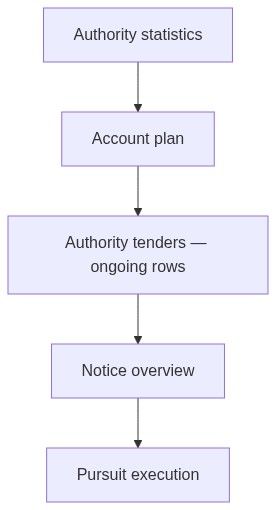
Numbered workflow — annual account plan
Open authority → Statistics.
Set year = last complete calendar year; note currency.
Overview → record seasonality peaks → align sales capacity.
Breakdown → note dominant contract type (e.g. 70% supplies).
Companies → list top 3 incumbents → open Company statistics for each.
Trends → check if price weight increased.
Tenders tab → filter ongoing → shortlist notices → Create pursuit on go items.
Optional: pin authority entity card on Custom dashboard.
Example analysis path
Select year = 2024, currency = EUR ↓Overview → note publication peaks (seasonality) ↓Breakdown → see supplies-heavy mix ↓Companies → identify incumbent suppliers ↓Trends → check evaluation criteria shift ↓Open competitor → Statistics → Head to head ↓Open ongoing notice → Create pursuitLoading behavior
Heavy sections use deferred cards — placeholder loading placeholder until scrolled into view or tab activated. Initial dashboard fetch may show Compiling the latest dashboard for this contracting authority.
Failed dashboard fetch: Failed to load statistics with Retry.
Relationship to pursuits
Authority statistics does not copy into pursuit modules automatically. After research:
Create pursuit from target notice.
Record strategy in Understanding (award criteria, risks).
Align Financial offer pricing with competition intensity insights.
Permissions
Edge cases
What you cannot do
Forecast unpublished tenders
Edit historical award data
Set alerts from statistics page alone (use Opportunities → Alerts)
Create pursuit without opening a notice
FAQ
Why does tab URL change?
Deep-linking preserves tab when sharing links with colleagues.
Data vs. single notice?
Statistics aggregate many notices; confirm critical deadlines on Notice overview.
Empty dashboard?
Authority may have insufficient indexed history — try all-years scope.
How does this compare to market statistics?
Market statistics is national; this is one buyer.
Can I export charts?
Screenshot or use export if card offers it — varies by widget.
Do trends predict next procedure type?
They hint at habits only — always read current tender documents.
Related articles
Contracting authorities directory
Authority tenders
Market statistics
Company statistics
Contracting authority (entity)
First pursuit workflow
Was this helpful?
Still need help? Ask the team