Documents library
Overview
The documents library is the pursuit file browser: uploaded tender PDFs, generated forms, exported offers, and team-created files. Central attachment store for the workspace and entry point to Document editor and Required documents.
Without documents here, In-depth analysis has nothing to read. Generated outputs from Construction standard forms land here automatically.
Tip: Before analysis or form export, confirm you have:
Full tender package uploaded (all volumes)
Folder structure mirroring authority volumes (Vol. I, II, III)
Latest notice-synced files for notice-backed pursuits
Naming convention your team recognizes in final ZIP
Backup via Download all before major merges
Important: Deleting a document may break questionnaire evidence links and analysis citations — confirm no references first.
When this module appears
Works default ordering may list construction forms before library — both live under Documentation.
How to open
Layout
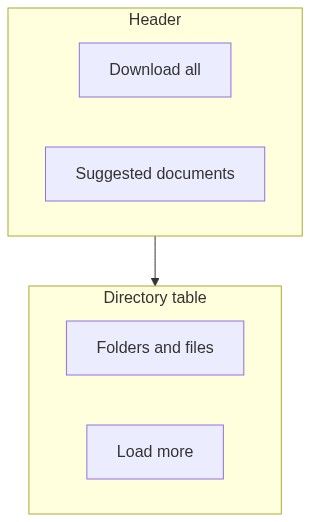
Directory table
Table — folders and files.
Supports nested folders for volume organization.
Topbar actions
Key actions
Upload workflow
```mermaid
sequenceDiagram
participant U as User
participant D as Documents library
participant S as Storage
U->>D: Upload PDFs
D->>S: Store assets
S-->>D: Entries created
D-->>U: Table refresh
```
Uploaded docs feed in-depth analysis selection.
Numbered workflow — organize tender package
Create folders per authority volume labels.
Upload qualification PDFs to Vol. I folder.
Upload specs to Vol. II.
Upload BOQ / financial templates to Vol. III.
Notice-backed: verify sync added authority files — dedupe duplicates.
Start in-depth analysis from complete set.
Track gaps via Suggested documents.
Empty and processing states
Downstream dependencies
live and collaboration
Teammates may upload concurrently — refresh list if counts look stale. Deleting a file someone has open in editor shows toast and redirect for them.
Edge cases
FAQ
Notice documents auto-appear?
Notice-backed pursuits sync authority files — still verify completeness.
Can guests upload?
No — team members only.
Version control?
Use save as / rename — no git-style history in library.
Link from questionnaire evidence?
Pick document from library in requirement detail.
Download all password?
ZIP unencrypted unless you encrypt offline.
Construction forms location?
Exported to library folders per profile rules.
Related articles
Document editor
Required documents
In-depth analysis — create
Construction standard forms
Final checkup
First pursuit workflow
Was this helpful?
Still need help? Ask the team