New chat
Overview
New chat starts a fresh assistant conversation on Home. Previous chats remain in Recents — nothing is deleted unless you explicitly delete a session.
Use New chat when you switch to an unrelated task so context stays clean and Recents titles stay meaningful. Do not use it to cancel an in-progress action (use Stop or reject an approval card instead).
Tip: Start New chat when:
You finished one task (tender search) and start another (team settings)
You read a teammate's shared chat and want your own writable thread
Titles in Recents are confusing because one thread mixed many topics
Important: New chat stops any in-progress reply for the current chat. It does not delete that chat from Recents.
Where to find New chat
Same action in both places — no separate page.
What happens when you click New chat
Any in-progress assistant reply for the current chat stops.
Active conversation clears — you return to the start screen.
Composer empties; intelligence and web search reset to defaults.
Page title becomes Home.
Recents list is unchanged — all past chats remain.
You see the greeting ("What can I do for you?"), starter suggestion chips, and optionally Continue your projects when deadlines exist.
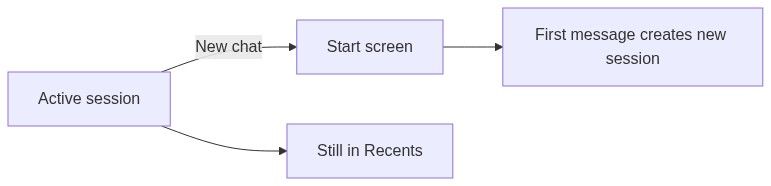
First message in a new chat
No conversation exists until you send something.
When you submit the first message:
See Assistant session for session lifecycle.
New chat vs delete session
Deleting your last chat looks like New chat visually, but the session is gone — not merely deselected.
What resets vs what stays
Clears
Keeps
When to use New chat
Good uses
Do not use New chat to
Renaming sessions
Auto titles come from your first messages and may be vague.
In Recents, open the session ⋮ menu.
Click Rename.
Enter a clear title (e.g. Hospital HVAC tender search).
Press Enter to save or Escape to cancel.
Renaming is disabled on read-only sessions.
New chat and teams
Always verify active team before starting important work.
Interaction with queued messages
If you click New chat while messages were queued on the previous session:
Queue for that previous session is abandoned from the UI perspective
Those queued messages do not transfer to the new chat
Return to the old session from Recents if you still need to send them
FAQ
Does New chat delete my old conversation?
No. Old chats stay in Recents until you Delete them.
Will New chat undo pursuit changes the assistant made?
No. Product changes persist. Only the chat view resets.
Can I have two active chats at once?
You view one at a time. Others remain in Recents; background chats may show a pulsing dot if still running.
Why did intelligence reset?
New chat restores composer defaults. Set intelligence again if you need Maximum for the new thread.
I clicked New chat by mistake — can I recover?
Open the previous chat from Recents. History is intact unless you deleted it.
Does New chat sign me out?
No. It only clears the active conversation on Home.
Related articles
Dashboard (Home)
Dashboard assistant
Assistant session
Search chats
Was this helpful?
Still need help? Ask the team