Companies directory
Overview
The Companies directory lists bidders and suppliers from public procurement data — competitors, partners, and industry players aggregated from official publications. Research participation history, win rates, authority relationships, and head-to-head patterns before you commit bid resources on Team → Pursuits.
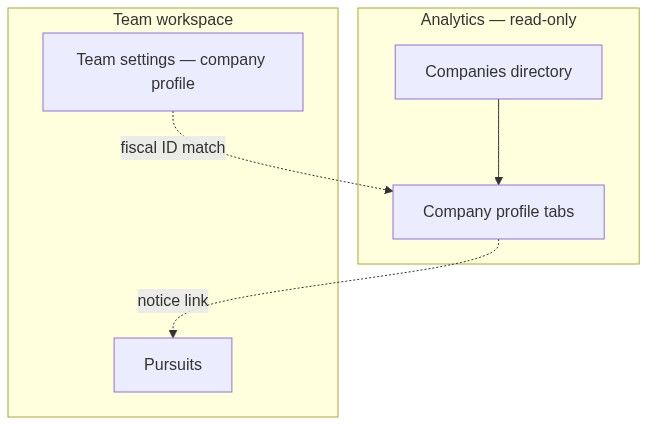
This directory is market intelligence. It is not your organization's legal profile. For VAT, address, and banking used in generated forms, see Company profile and Company (two meanings).
Tip: Before competitive research, confirm you have:
Completed Team → Settings → Company profile so fiscal ID matching enables Strategic gap views
A target country and optional fiscal identifier for homonym disambiguation
Bookmarked the pursuit's contracting authority for cross-check on Authority statistics
Understood that directory rows are read-only — you cannot edit competitor records
Important: Opening a company profile does not create a pursuit. When you find a relevant notice in their Tenders tab, open the notice and use Create pursuit for your team.
Directory vs team company profile
How to open
Page layout
Desktop (≥1024px)
Resizable split panel:
┌──────────────┬────────────────────────────────────┐│ Filters │ Sort + pagination + directory ││ (≈20%) │ (≈80%) │└──────────────┴────────────────────────────────────┘Drag the handle to widen the filter panel (typically 15–30% range).
Mobile
Tap Filters — left sheet with the same filter panel.
Sort control and list stack vertically below.
Filters panel
Add filters via + New filter. Applied filters show as dismissible badges above the list.
Filters update shortly after you stop changing filters. Changing filters resets to page 1.
Numbered workflow — find a competitor
Analytics → Companies.
Add Country codes for your market.
Add Keywords with distinctive name fragment.
If homonyms appear, add Fiscal identifier.
Sort by Total value of won tenders descending.
Open the company row → profile Statistics tab.
Sort
Dropdown at top-right of the list:
Directory list
Companies group under alphabetical letter headers (sticky section titles).
Each entry row:
Pagination
Top and sticky bottom pagination when results exist.
Page number syncs to URL
?page=— shareable with colleagues.
States
Company profile navigation
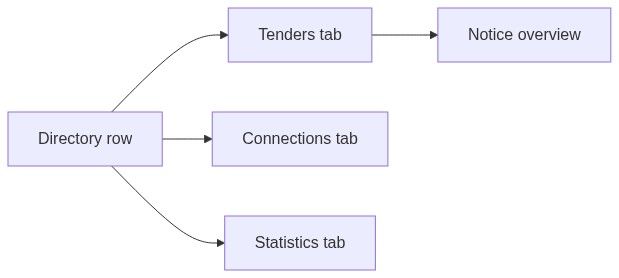
Click any company to open its profile. Inner tabs:
Opening a profile lands on Tenders by default.
"Our company" comparison
When your company profile fiscal identifier matches a directory record:
Complete team settings so the fiscal ID match resolves. Wrong or missing VAT breaks comparison features.
Typical research workflow
Filter by won amount + country or keywords.
Open top competitors → Statistics tab.
Review Win rate trend and Main competitors.
Open Connections for consortium patterns.
On Tenders tab, open notices you also target → evaluate on notice overview.
Create pursuit only when your team commits to bid.
Link from notices
On Notice participants, click any Company link to jump to that company's profile. Useful immediately after award publications to see winner history.
Permissions
What you cannot do
Edit company name, fiscal ID, or win counts
Merge duplicate companies manually
Export the entire directory in one click (use per-profile research)
Create pursuits from the directory list without opening a notice
Edge cases
FAQ
Why can't I find my own company?
Your team profile is separate. Directory companies come from tender participant data. Matching happens via fiscal identifier when publications include it.
Are fiscal identifiers always shown?
When available from source publications. Some jurisdictions redact or format differently.
Can I edit a company record?
No. Directory data is read-only market intelligence.
Does the directory show subcontractors?
Only when they appear as named participants in synced publications.
How is this different from Notice participants?
Participants tab is one notice. Directory is lifetime participation for that company entity.
Can I alert when a competitor wins?
Use Alerts on notice criteria, not competitor-specific alerts from directory alone.
Related articles
Company tenders
Company connections
Company statistics
Notice participants
Company (entity)
Contracting authorities directory
Was this helpful?
Still need help? Ask the team