Alert rulesets
Overview
Alerts (rulesets) are saved searches that notify you when new or updated notices match your criteria — keywords, CPV codes, value ranges, countries, contracting authorities, and more. Instead of repeating the same Notices browse filter every morning, you define rules once and let Tendersight watch the market continuously.
Alerts sit between discovery and execution: matches land in email digests, the Activity tab, and Home widgets; from there you open notice detail and create pursuits. The same filter engine powers Lead Finder and the create wizard — criteria are portable across browse and alerts.
Tip: Before you rely on alerts as your sole pipeline source, confirm:
At least one ruleset uses Ongoing status if you want actionable tenders
Keywords are specific enough to avoid noise but broad enough to catch variants
Notification frequency matches how often you actually review email
You know team vs personal scope — team rulesets are visible to colleagues
You are within plan ruleset limits (usage meter on list header)
Important: Alert filters are fixed at creation in the current UI. To change matching rules, create a new ruleset — see Edit alert for what you can still tune without recreating.
How alerts fit in Opportunities
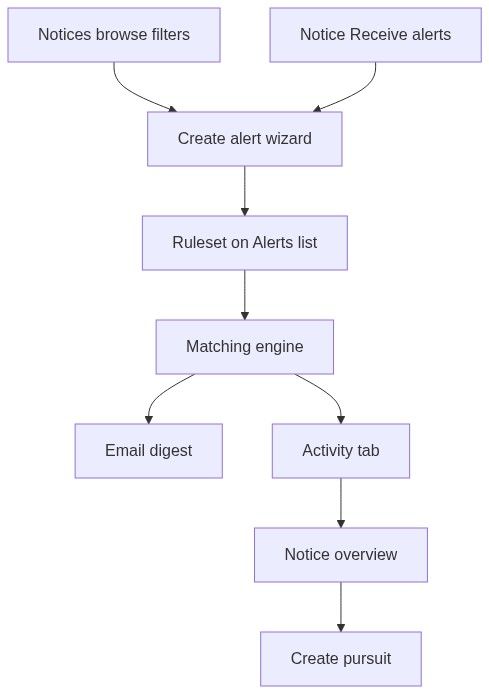
How to open the Alerts list
Sign in — guests are redirected to login.
In the sidebar, open Opportunities → Alerts.
Alternate entry: Team overview checklist → configure alerts step.
Empty state
When you have no rulesets:
List page (with rulesets)
Header
Usage counts refresh when you change pages in the list.
Ruleset grid
Each card shows:
Responsive grid layout. Pagination below when multiple pages exist.
Detail panel (spotlight)
Opens when you click a card or open a shared link with a ruleset selected.
Wide right sheet, scrollable.
Closing the panel deselects the ruleset.
For field-level editing, see Edit alert.
Spotlight tabs — tab by tab
Overview tab
Configuration tab
Read-only preview of filter rules:
Cumulative badge — tooltip: All of the conditions must be met for an alert to be triggered.
Each rule rendered as preview card with filter chips
AND semantics — every configured filter must pass
You cannot add, remove, or modify filters here in the current product. Plan changes via Create alert.
Activity tab
Trigger history for this ruleset:
Recent matches / occurrences
Timestamps and match counts
Links to matched notices when available
Use Activity to judge if a ruleset is too broad (noise) or too narrow (silence) before duplicating with adjusted filters.
What alerts search
Matching evaluates new and updated notices against your rules:
All rules must match (AND logic). OR-style "any of these CPV" requires separate rulesets or broader CPV selection in one filter — follow Lead Finder filter dialog behavior.
Alerts target forward-looking matches when notices enter or update in the index — not a full retroactive rescan of historical catalog unless product behavior explicitly backfills (treat as forward watch).
Notification delivery
Set at creation (Create alert step 1):
Matches appear as:
Email per digest setting
Activity tab in spotlight
Team overview → Today's alert notifications
Home alert widgets when configured
Team vs personal scope
Chosen in create wizard step 1 — not changeable after creation in the current UI.
Limits and billing
Upgrade via billing when at cap. Delete unused rulesets via card ⋮ → Remove.
Typical lifecycle
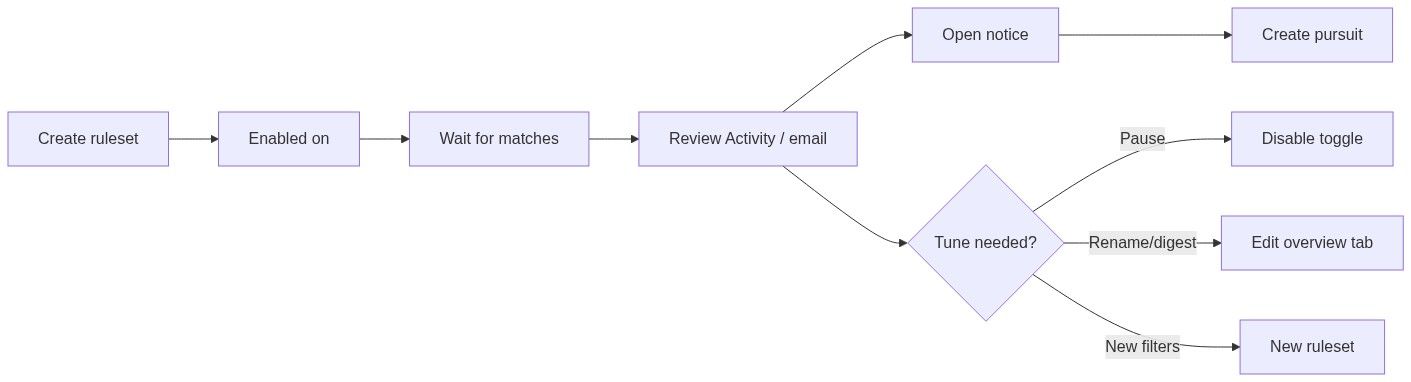
Create ruleset with filters + digest — Create alert.
Enable and wait for matches.
Review Activity or email digest.
Open notice → evaluate → Create pursuit.
Tune: rename, pause, change frequency via Edit alert; recreate if filters must change.
What you can and cannot do
You can
Create, view, pause, rename, and delete rulesets
Review match history in Activity
Open matched notices from Activity links
You cannot
Edit filter rules after creation (current UI)
Change personal/team scope after creation
Transfer ownership to another user from spotlight
Force instant match on a specific historical notice retroactively
Troubleshooting
FAQ
Can I edit filters after creation?
Not in the current UI. View Configuration and create a new ruleset if filters must change.
Do alerts match historical notices?
Alerts focus on newly detected or updated matches going forward, not replacing full browse search over the entire catalog.
Who receives team alert emails?
Team members per notification routing — digest emails go to subscribed people on the team.
Can I have duplicate rulesets with the same filters?
Yes — useful for different digest schedules or personal vs team scope. Disable duplicates to avoid noise.
How do keywords in alerts differ from browse?
Same engine — document text included. Same tips apply: start specific, avoid over-stacking AND filters.
Can the Home assistant create alerts for me?
The assistant may create or update rulesets — always verify Configuration tab afterward.
Related articles
Create alert
Edit alert
Notice overview
Notices browse
Team overview
Notice (Tender)
Was this helpful?
Still need help? Ask the team