Permissions and access

Overview

Who can see and change what in Tendersight depends on four layers that stack together: whether you are signed in, which team is active in the sidebar, your role on that team, and which subscription features the team has purchased. A fifth pattern β€” dashboard sharing β€” applies only to custom analytics boards and is independent of team roles.

Most day-to-day confusion is not about obscure admin flags. It is about mixing guest browse with member workspace, opening a notice while the wrong team is active, or expecting analytics pages to edit pursuits. This article is the full access map: what guests see, what teammates can do, and what your plan unlocks.

Tip: When something looks missing or read-only, check in this order:

  • Are you signed in? (Guests lose participants, alerts, pursuits, assistant)

  • Is the correct active team selected in the sidebar?

  • Does your team role allow the action? (Some settings need Administrator)

  • Does the team's subscription include the feature? (Connection diagram, pursuit slots, AI credits)

  • For dashboards: are you a manager or viewer on that board?

Important: Pursuits, products, settings, and billing are scoped to one team. You never see another team's pursuits while a different team is active. Switching teams changes assistant history, credit balance, and whether a notice shows Create pursuit or Go to pursuit.


How the four layers combine
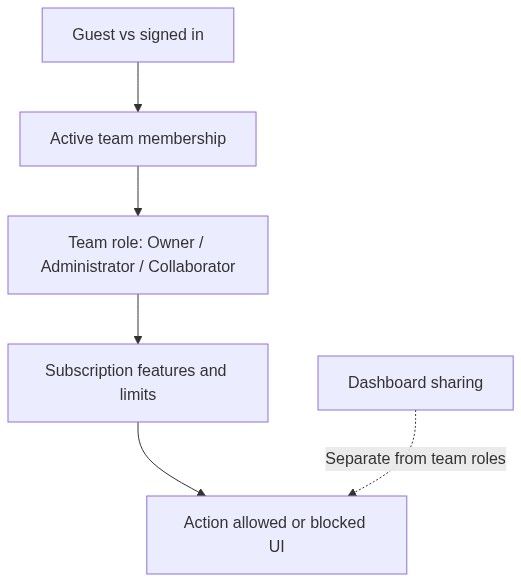
Flow diagram

Layer

Question it answers

Example effect

Authentication

Are you logged in?

Alerts and pursuits redirect to login

Team scope

Which workspace is active?

Pursuit list, assistant, billing

Team role

Can you manage members or delete resources?

Invite users, some inventory actions

Subscription

Is the feature on the plan?

Document download, connection diagram, pursuit limit

Dashboard ACL

Can you edit this board?

Private vs team vs public dashboards


Public vs signed-in access

Baseline rules before team and plan specifics.

Area

Guest (not signed in)

Signed in

Notice overview text and key facts

Often yes

Yes

Notice tender documents

Often restricted

Yes (subscription may apply)

Notice participants tab

No

Yes

Notice product extraction

No

Yes (+ AI credits)

Create pursuit / Go to pursuit

No

Team member; plan pursuit limit

Market statistics

Partial

Full (some scopes may still gate)

Companies / authorities directory

Partial browse

Full profiles

Company statistics (full tabs)

Limited

Yes

Company connection diagram

No

Subscription feature required

Alerts list and create

Redirect to login

Full (ruleset count per plan)

Custom dashboards

No

Yes (view/edit per board permissions)

Team section (pursuits, settings, inventory)

No

Team member only

Home assistant

No

Yes (active team scope)

Account profile and API tokens

No

Your account

Caution: "Signed in" alone is not enough for workspace features. You must be a member of the team that owns the pursuit, product, or settings page you are trying to open.


Opportunities section

Page / feature

Guest

Signed in

Notes

Notices browse

Often browse

Full

Pursuit actions need login

Notice overview

Overview often public

Full

Documents and participants gated

Notice lots, versions, products tabs

Varies

Full with credits for extraction

Obsolete version banner for all who can view

Alerts list

No

Yes

Login required

Create alert

No

Yes

Plan limits on ruleset count

Alert activity and digest emails

No

Yes

Links open notice detail

Notice command bar (signed in)

Control

Typical requirement

Share

Signed in

Add to calendar

Signed in

Receive alerts

Signed in; counts toward ruleset limit

Create pursuit

Team member; available pursuit slot on plan

Go to pursuit

Active team already has pursuit on this notice

Guests may see a reduced command bar; pursuit and document actions often require sign-in and subscription.


Analytics section

Page / feature

Guest

Signed in

Subscription notes

Market statistics

Partial

Generally full

Filters may differ

Companies directory

Browse often OK

Full

Stats tabs need auth

Company statistics

Limited tabs

Full tabs

Strategic gap needs fiscal match with team profile

Company connections

No

Yes

Company connection diagram feature required

Authority statistics

Partial

Full dashboard

Some widgets may gate

Custom dashboards

No

Per-board visibility

Editing requires manager access on board

Analytics is read-only for market data. Opening a tender from a company or authority profile does not grant pursuit edit rights β€” it opens the same notice detail as Opportunities.


Team membership and workspace access

Workspace features require membership on the team whose data you are viewing.

Feature area

Requires team membership

Team overview and pipeline widgets

Yes

Pursuits list and pursuit modules

Yes

Inventory β€” products, categories, imports

Yes

Team settings β€” company profile, banking, legal rep

Yes (edit may need Administrator)

Billing portal

Yes

Home assistant sessions and scheduled tasks

Yes β€” active team scope

Team-scoped alert rulesets

Yes

Integrations, knowledge, questionnaires (management layout)

Yes

Switching active team

When you change the team in the sidebar switcher:

What changes

What does not change

Pursuits kanban and pursuit modules

Your personal account login

Assistant chat history and scheduled tasks

Market notices (still shared catalog)

Product catalog and team settings

Other teams' data (still hidden)

Billing and AI credit balance

Analytics directories (still global read)

Create pursuit vs Go to pursuit on a notice

β€”

Always confirm the sidebar team name before Create pursuit on a notice.


Team roles

Every team has exactly one owner and one or more members with assignable roles.

Role

Scope

Typical capabilities

Owner

One per team

Transfer ownership, delete team, full management; shown with admin navigation access

Administrator

One or more

Invite and remove members, change roles, team settings, billing (when permitted), many destructive inventory actions

Collaborator

Standard member

Pursuits, questionnaire, offers, documents, most inventory β€” no team deletion or ownership transfer

Role assignment happens on Team management β†’ Management β†’ Users (Team members). Members can hold multiple roles (for example Administrator plus another role); the UI shows combined labels like "Administrator +2".

Action

Owner

Administrator

Collaborator

View and edit pursuits

Yes

Yes

Yes (team policy may restrict create)

Invite / remove members

Yes

Yes

No

Change member roles

Yes

Yes

No

Delete team

Yes

No

No

Transfer ownership

Yes

No

No

Edit company profile / banking

Yes

Yes

Often yes β€” sensitive fields may vary

CSV product import / some inventory deletes

Yes

Yes

Varies by action

Create integrations

Yes

Often yes

View only

Important: You cannot remove the last member who can manage the team. The UI blocks removal with Cannot remove member.

Some pages (team rename on overview, knowledge templates, integrations) may require Administrator depending on team policy. When in doubt, ask a team owner to confirm your roles.


Pursuit access

Pursuits are team-private. There is no cross-team pursuit sharing on the same notice.

Action

Requirement

View pursuit overview and modules

Member of the pursuit's team

Create pursuit from notice

Team member; active team or explicit team picker; pursuit slot on plan

Create standalone pursuit

Same as above

Edit questionnaire, offers, documents

Same team membership

Assign pursuit owner

Team member list

Delete pursuit

Team member with delete permission (typically Administrator or owner policy)

Cardinality rule: At most one pursuit per team per notice. Team A and Team B each get separate workspaces; they never see each other's answers or pricing.


Home and assistant access

Feature

Requirement

Open Overview β†’ Home

Signed in

New chat and recents

Signed in; scoped to active team

Assistant tools (search notices, open pursuits, update settings)

Signed in; team context from active team

Scheduled tasks

Team management access; runs in team scope

Intelligence tier selection (Auto, Fast, Balanced, Maximum)

Signed in; consumes AI credits

Shared chat links may be read-only for teammates depending on how the session was shared. See New chat and Dashboard assistant.


Dashboard sharing permissions

Custom dashboards under Analytics β†’ Dashboards use visibility layers separate from team roles.

Visibility

Who can view

Who can edit widgets / layout

Private

Owner and explicitly invited identities

Owner (managers per board)

Shared

Invited emails or identities

Board managers

Team

All members of the linked team

Board managers

Public

Anyone with the link

Board managers

Read-only viewers see a badge on the dashboard top bar β€” no edit mode, no widget configuration.

Symptom

Likely cause

Dashboard opens but no edit controls

You are a viewer, not a manager

Cannot find a colleague's board

Private visibility or different team link

Team visibility but colleague cannot see

They are not on the linked team


Subscription and plan gates

Blocked actions show upgrade prompts, payment-required toasts, or disabled buttons with explanation text.

Feature

Typical gate

Tender document download on notice

Active subscription

Pursuit creation

Plan pursuit limit β€” count of active pursuits

Alert ruleset count

Plan limit on number of rulesets

Company connection diagram

Named subscription feature

AI in-depth analysis, product extraction, assistant

AI credits per active team

Product import with AI parsing

Subscription feature + credits

Full authority statistics dashboard

Sign-in; some tabs may need plan tier

Notice product extraction tab

Sign-in + credits

Credit balance and limits appear under Team β†’ Billing. Pursuit limits often surface at Create pursuit time.
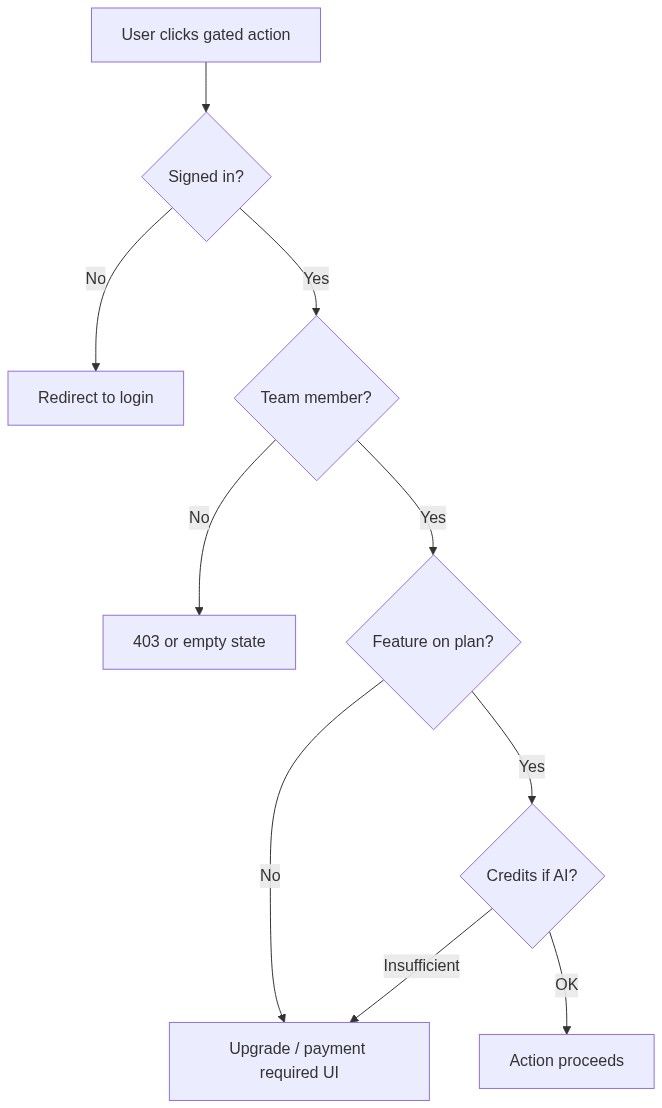
Flow diagram

Team management pages (inner navigation)

The compact Team sidebar shows Overview, Pursuits, Inventory, Billing, Settings. Users, Integrations, Knowledge, and Scheduled tasks live in the inner layout when you open Team β†’ Overview β€” invite/remove on Management β†’ Users typically requires Administrator.

Inside pursuits, all team members with access share module visibility (questionnaire, offers, documents). External users need a team invitation.


Account-level vs team-level

Item

Scoped to

Email, password, personal profile

Account

API tokens (personal automation)

Account

Pursuits, products, settings, billing

Team

Notices, authorities, market companies

Global catalog (read-only)

Custom dashboards

Board owner + visibility rules

Deleting your account is separate from deleting a team. Removing you from a team revokes workspace access but leaves your past assignments on records the team still owns.


Troubleshooting access issues

Symptom

Likely cause

What to try

Participants tab missing on notice

Guest session or zero published participants

Sign in; check after award

Create pursuit disabled or missing

Not logged in, wrong team, or pursuit limit reached

Sign in; check billing; archive old pursuits

Button says Go to pursuit but you expected create

Active team already has pursuit on this notice

Switch team or open existing pursuit

Company statistics shows auth wall

Guest

Sign in

Strategic gap disabled or empty

Viewing own company without fiscal match to team profile

Complete company profile VAT; pick competitor

Dashboard read-only

Not a board manager

Ask owner for manager access

Alerts page 403

Not logged in

Sign in

Connection diagram shows upgrade

Plan lacks feature

Billing upgrade

Document download blocked

Subscription or sign-in

Sign in; check plan

Assistant empty or wrong pursuits

Wrong active team

Switch team in sidebar

Cannot remove team member

Last manageable member

Promote another Administrator first

AI action fails immediately

Insufficient credits

Team β†’ Billing top-up or tier change


FAQ

Why can I see a notice but not download documents?

Guests and some signed-in users hit subscription or sign-in gates on document download. Open Team β†’ Billing if you are a member and still blocked.

I am signed in but cannot see Pursuits in the sidebar.

You may not belong to any team yet, or you are viewing a global page without team context. Complete onboarding or accept a team invitation.

Can a Collaborator invite new members?

Typically no β€” Administrator or owner invites members on Team members. Policies may vary; check with your team owner.

Why does my colleague see Go to pursuit and I see Create pursuit on the same notice?

Create pursuit / Go to pursuit reflects the active team in your sidebar, not your colleague's. Different teams β†’ different buttons.

Do dashboard "team" visibility and team sidebar mean the same thing?

Related but not identical. A dashboard linked to team visibility is visible to members of that team. You still need manager role on the board to edit widgets.

Can I view analytics without a team?

Partially. Many directories and notice overviews work for guests or account-only users. Pursuits, alerts, and full assistant require team membership.

Who can delete the team?

Owner only. Deletion removes pursuits, inventory, and settings for that team. See Delete team.

Why is product extraction disabled on a notice?

Usually not signed in, or insufficient AI credits on the active team.


  • Core concepts

  • Platform overview

  • Team

  • Team members

  • Transfer ownership

  • Delete team

  • Company statistics

  • Custom dashboards

  • Billing