Financial offer
Overview
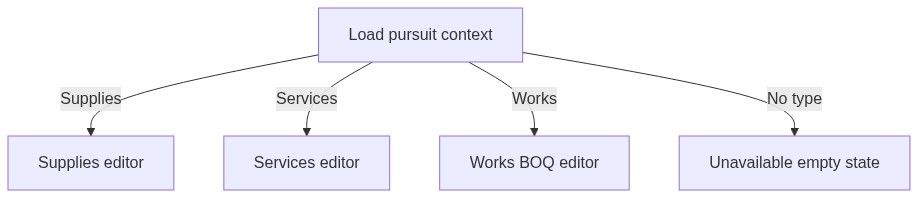
The financial offer module is where you price your bid. The editor adapts to pursuit type: item-based catalog pricing for supplies, rate card / staffing for services, and BOQ cascade pricing for works. One sidebar entry — three pricing engines behind pursuit type configuration.
Pricing connects to Technical offer product lines (supplies), staffing assumptions (services), and Works offer BOQ structure (works). Final checkup flags unpriced lines and zero totals.
Tip: Before entering prices, confirm you have:
Set pursuit type on Overview
Completed technical structure (products, rate roles, or BOQ import)
Chosen currency consistent with tender rules
Simulated totals against estimated contract value
Team banking settings for forms that echo IBAN (via document generation)
Important: Simulation tweaks do not export until applied to live rows — confirm which mode you are in.
When this module appears
Country profiles register one financial module per type.
How to open
Layout by type
Supplies editor
Services editor
Works editor
BOQ structure shared with Works offer; pricing happens here.
Key actions
Numbered workflow — supplies pricing
Complete Technical offer product import.
Open financial offer — import lines from technical.
Enter or sync unit prices.
Run simulation for discount scenarios.
Apply winning scenario to live rows.
Verify grand total vs tender estimated value.
Open Final checkup.
Numbered workflow — works BOQ pricing
Import BOQ via Works offer or analysis.
Verify hierarchy in BOQ tab.
Enter unit rates per line in financial editor.
Check cascade section totals.
Use summary tab for unpriced item count = 0.
Feed totals to Construction standard forms Vol. III.
Relationship to works offer

No separate BOQ sidebar link in many profiles — integrated editor is single entry.
Empty and processing states
Downstream dependencies
Edge cases
FAQ
Can financial offer exist without technical?
Supplies: import path expects technical lines. Services: rate card can stand alone.
Does VAT belong here?
Follow tender instructions — some forms separate VAT.
Works — where is BOQ structure edited?
Works offer or structure tab in integrated editor.
Auto-save conflicts?
Refresh if optimistic save errors.
Export to Excel?
Use document generation / authority template paths.
Lost pricing after type change?
Avoid changing pursuit type after pricing — regenerate.
Related articles
Works offer
Technical offer
Construction standard forms
Final checkup
Pursuit overview
First pursuit workflow
Was this helpful?
Still need help? Ask the team