Works offer (Bill of Quantities)
Overview
The works offer module stores the authority's Bill of Quantities (BOQ) — sections, chapters, line items, quantities, and measurement units. For works (construction) pursuits only. Many country profiles expose BOQ through the integrated Financial offer editor; a dedicated Works offer sidebar entry appears when your country profile includes it.
Structure without pricing is useless; pricing without correct structure breaks cascade totals. Complete structural edits before unit rate entry.
Tip: Before BOQ import, confirm you have:
Pursuit type = works and correct country on Overview
Authority BOQ PDF in Documents library
Run In-depth analysis with BOQ category when available
Validated section/chapter hierarchy against authority PDF
Team ready for long edit sessions — large BOQs have thousands of lines
Caution: Navigating away with dirty cells triggers unsaved warning — save batches regularly.
When this module applies
How to open
Layout (dedicated BOQ page)
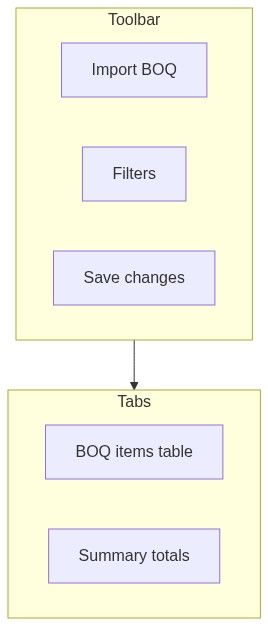
BOQ items tab
Hierarchical table by section and chapter.
Summary tab
Counts: sections, chapters, items, priced vs unpriced.
Filters sidebar
Search by section, chapter, or text.
Key actions
Dirty cell tracking
Numbered workflow — BOQ from analysis to priced
Run analysis on authority BOQ PDF.
Import extracted structure to works offer.
Spot-check 10 random lines against source PDF.
Fix hierarchy misalignments.
Save structural changes.
Open Financial offer — enter unit rates.
Summary tab → unpriced count = 0.
Construction standard forms financial volume.
Final checkup.
Data flow

Empty and processing states
Downstream dependencies
Edge cases
FAQ
Separate works offer vs financial only?
Country profile decides — both use same data layer.
Can I import Excel BOQ?
Use import dialog supported formats.
Edit unit price here?
Usually in financial offer editor — structure here, rates there.
BOQ changed in addendum?
Re-import delta; review priced lines.
Thousands of rows performance?
Use filters; save in batches.
Link to questionnaire?
Technical descriptions may reference BOQ items in narrative modules.
Related articles
Financial offer
In-depth analysis — create
Construction standard forms
Final checkup
Pursuit overview
First pursuit workflow
Was this helpful?
Still need help? Ask the team