Assistant session
Overview
An assistant session is one saved conversation with the dashboard assistant on Home. Each session has a title, full message history, a tool-step log of what the assistant did, and optional approval checkpoints where you confirmed sensitive actions.
Sessions are lazy-created — no empty session exists until you send the first message. After that, opening the session from Recents or Search chats loads the complete thread in the same Home layout.
Tip: Treat sessions like project notebooks:
One session per major task (single tender search, one pursuit update)
Rename vague auto-titles before Recents grows long
Use Search chats when scrolling Recents is slow
Remember deleting a session does not undo pursuit or settings changes
Important: Sessions belong to one team. Teammates on the same team can open your session read-only — they cannot send messages in your thread.
How sessions are created
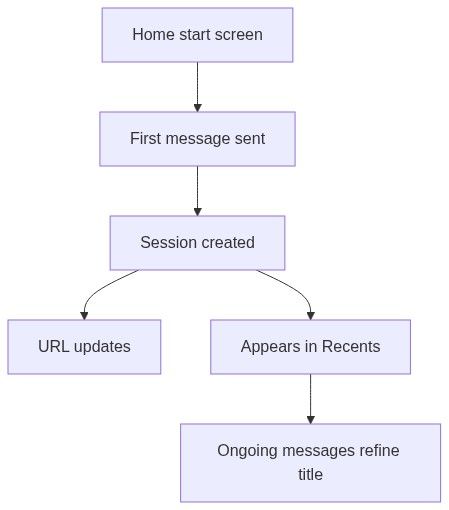
Step by step
Start from Home (no session selected) or click New chat.
Type and send your first message.
Server creates the session.
Browser address updates to that conversation.
Title may briefly show New chat, then refine from content.
Row appears in Recents.
Opening an existing session
Loading states
Authorization
Page behaviour
The session view uses the same Home shell — not a separate app area:
Page title = session title (or Home when none selected).
Session lifecycle
During an active session
Session menu (Recents ⋮ or right-click)
Deleting the active session switches to another chat or New chat.
Deliverables and attachments
The assistant may attach generated files to messages — exports, filled documents, downloads.
Locate the message with attachments.
Click the attachment to download or open.
Files are tied to the session history — deleting the session removes the chat record, not necessarily the underlying pursuit documents already saved in the product.
Team scoping
Session vs New chat vs delete
Real-time and background activity
You may navigate away while a session runs:
Stopping from another session does not stop background runs on a different row unless you open that chat and press Stop.
Best practices
Edge cases
Troubleshooting
FAQ
Can I share a session URL with a colleague?
They can open it read-only on the same team. They cannot send in your session.
Does deleting a session undo platform changes?
No. Pursuits, settings updates, and documents persist — only chat history is removed.
Is there a limit on sessions per team?
Recents loads in batches (20); older sessions remain reachable via scroll and search.
Can I move a session to another team?
No. Create a new chat on the other team and summarise what you need.
Do sessions expire?
No automatic expiry in normal use — delete manually when no longer needed.
Why can I see a colleague's chat?
Same-team visibility supports transparency; write access is owner-only per session.
Related articles
Dashboard (Home)
Dashboard assistant
New chat
Search chats
Working with AI assistant
Was this helpful?
Still need help? Ask the team