Terminology glossary

Overview

Tendersight reuses everyday procurement words in precise product senses. Tender and notice often mean the same catalog object; pursuit and project mean your team's bid workspace; company can mean your legal profile or a competitor in analytics. This glossary is the quick reference when navigation labels, assistant replies, or colleague shorthand do not line up.

Terms are grouped by product area. For conceptual depth β€” planes of data, paths to a pursuit, subscription limits β€” see Core concepts and Platform overview.

Tip: When two terms appear together and feel redundant, check the Easily confused pairs section at the end before opening a support ticket.

Important: This article defines product language, not legal procurement definitions in every EU member state. National procedure names (CN, SCN, CAN) describe publication types on notices β€” they are not separate Tendersight objects.


Account, team, and identity
Term

Meaning in Tendersight

Account

Your personal login (email, profile). One person can join many teams.

Team

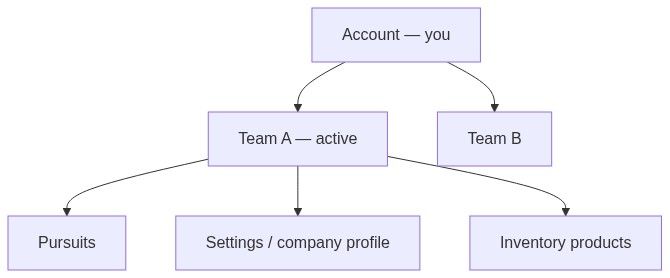
Shared workspace β€” pursuits, inventory, settings, billing, AI credits. Unit of collaboration.

Active team

Team currently selected in the sidebar switcher. Scopes assistant, pursuits, catalog, billing.

Owner

Single team member who can transfer ownership and delete the team.

Administrator

Role β€” invite/remove members, many settings and inventory admin actions.

Collaborator

Default member role β€” pursuits, offers, most inventory; not team deletion.

Organisation

Business entity described during onboarding; saved on the team.

Company profile

Legal entity under Team β†’ Settings (VAT, address, registry) for document auto-fill.

Legal representative

Signatory details in team settings for generated forms.

Banking information

IBAN and bank fields in team settings for financial documents.

Flow diagram

Platform navigation

Term

Meaning

Home

Overview β†’ Home β€” AI assistant and team widgets. Not the same as analytics dashboards.

Overview (sidebar)

Top-level group containing Home.

Opportunities

Sidebar group for notices catalog and alerts β€” what can I bid on?

Analytics

Sidebar group for statistics, directories, dashboards β€” what does the market look like?

Team

Sidebar group for your workspace β€” pursuits, inventory, billing, settings.

Lead Finder

Notice browse experience opened from Opportunities β†’ Notices.

Team management layout

Full team UI with inner sidebar β€” Users, Integrations, Knowledge, etc.

Command bar

Sticky action row on notice and pursuit detail pages (share, calendar, create pursuit).

Kanban

Board view on Team β†’ Pursuits β€” columns by pursuit status.


Opportunities and notices

Term

Meaning

Notice

Official procurement publication in the catalog β€” read-only. Primary label in Opportunities β†’ Notices.

Tender

Same object as notice; common on detail pages and in assistant chat.

Notices browse

Discovery list with filters β€” typically Lead Finder.

Notice overview

Main notice detail page β€” description, key facts, decision band, command bar.

Decision band

Four KPI tiles on notice overview β€” value, deadline, competition signal, lots.

Lot

Subdivision of a tender; you may bid one or all depending on procedure rules.

Participant

Company that bid or won on a procedure β€” visible especially after award.

CPV code

EU Common Procurement Vocabulary classification on notices and in filters.

Notice type

Publication kind β€” CN, SCN, CAN, etc. Describes the notice, not a separate object.

Reference ID

Internal Tendersight identifier on notices β€” useful for support.

Identifier

Official notice number from the source system; may link externally.

Contracting authority

Public buyer who published the notice.

Estimated value

Publication value field β€” filters, statistics, bid/no-bid context.

Submission deadline

Last date for offers per publication β€” calendar export available.

Versions timeline

Amendment chain between notice publications β€” always prefer latest version.

Obsolete version

You are viewing a superseded notice; banner links to latest.

Receive alerts

Command-bar action seeding a new alert ruleset from current notice filters.

Product extraction

AI list of buyer-required products from tender PDFs β€” Products tab on notice.

Tender product

Single extracted line item on a notice β€” not the same as team product in inventory.

Notice status labels

Status

Typical meaning for your team

Ongoing

Open for submission β€” actionable

Published

Visible; may overlap with ongoing depending on source

Awarded

Outcome published β€” check Participants

Evaluation

Submissions closed; authority evaluating

Suspended

Procedure paused β€” watch for amendments

Cancelled

Not proceeding β€” archive research

Rejected

Procedure invalid or annulled per source

Expired

Deadline passed without award path you can use


Alerts and monitoring

Term

Meaning

Alert / ruleset

Saved search criteria that notify you when new notices match.

Trigger occurrence

One firing of a ruleset when a new notice matched.

Digest interval

How often alert emails batch new matches (e.g. daily).

Activity

Alerts sub-page listing recent occurrences.

Keyword search

Matches document text inside notices β€” same engine as many filters.


Analytics and market intelligence

Term

Meaning

Market statistics

Aggregated charts across indexed notices β€” country, CPV, year, type.

Contracting authorities

Directory of public buyers with profile and tender history.

Companies (analytics)

Directory of market bidders β€” not your team company profile.

Widget

Single chart, table, or KPI tile on a custom dashboard.

Custom dashboard

User-composed board under Analytics β†’ Dashboards.

Breakdown dimension

Axis for grouping statistics β€” CPV, notice type, year, authority, etc.

Win rate

Wins Γ· participations where data exists.

Authority embeddedness

How concentrated a company's participations are on specific buyers.

Budget aggression

Tendency to bid near or above estimated contract value.

Strategic gap

CPV or markets where a competitor wins but your team profile does not β€” needs fiscal match.

Head to head

Direct comparison of two companies' metrics.

Connection diagram

Graph of companies that bid together on procedures β€” subscription feature.

Deferred card

Statistics section that loads after the main page shell β€” lazy-loaded block.

Market plane

Read-only imported data β€” notices, authorities, market companies.


Pursuit workspace

Term

Meaning

Pursuit

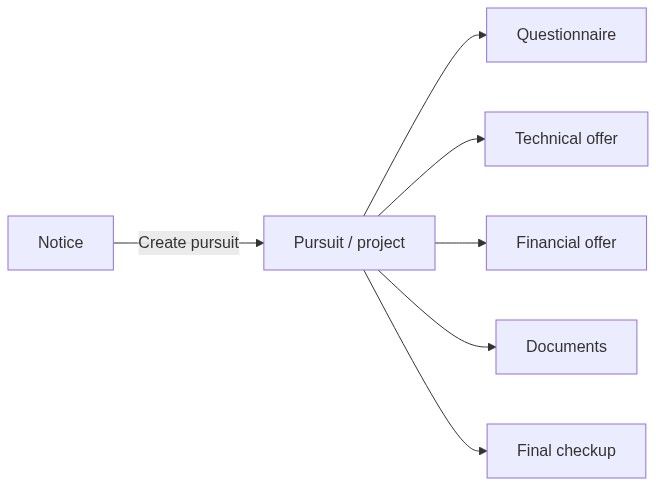
Your team's bid workspace for one opportunity β€” primary English label.

Project

Same object as pursuit; common in Romanian UI (proiect) and assistant phrasing.

Standalone pursuit

Pursuit created without a linked catalog notice β€” Source: standalone on board.

Pursuit type

Works, supplies, or services β€” controls which modules activate.

Country profile

Per-pursuit country β€” forms, modules, compliance templates (28 European countries).

Pursuit owner

Team member accountable on kanban filters and overview.

In-depth analysis

AI run extracting requirements from tender documents into questionnaire.

Questionnaire

Compliance requirement list with status, owners, SME review.

Requirement

Single compliance item β€” often from extraction or manual entry.

Requirement category

Taxonomy for compliance items β€” Questionnaires β†’ Categories in team management.

SME

Subject Matter Expert β€” reviewer assigned on requirements.

Technical offer

Module for technical forms, product matching, attribute mappings.

Financial offer

Module for pricing and commercial tables.

Attribute mapping

Link between a requirement attribute and catalog product data.

Automapping

AI suggesting product matches for requirements.

Final checkup

Pre-submission validation checklist module.

Task management

Pursuit tasks with owners and due dates.

Flow diagram

Team inventory and knowledge

Term

Meaning

Team product

Row in Team β†’ Inventory β†’ Products β€” your catalog item with specs and datasheets.

Product category

Inventory taxonomy β€” organizes team products for import and automapping.

Datasheet

Uploaded spec document attached to a team product.

CSV import

Bulk product load from spreadsheet template.

User manual upload

Product creation flow from manual PDF or document.

Specifications viewer

UI to inspect parsed product attributes.

Document template

Reusable team template in knowledge base for generated documents.

Human resources (knowledge)

Team roster entries used in some document contexts β€” not the same as Users.

Integration

Connected external service (e.g. e-commerce) under team management.

Caution: Product category (inventory) β‰  requirement category (questionnaires). Mixing them breaks automapping and SME routing.


Home, assistant, and automation

Term

Meaning

Assistant

AI chat on Home β€” search notices, manage pursuits, team-aware actions.

New chat

Start fresh assistant thread; previous chats stay in Recents.

Recents

List of past assistant conversations on Home sidebar.

Intelligence

Response quality tier β€” Auto, Fast, Balanced, Maximum; affects credits and latency.

Web search

Optional assistant mode pulling external web context.

Scheduled task

Recurring assistant prompt on a timer β€” team management feature.

Starter suggestions

Chips on Home start screen proposing common actions.

Continue your projects

Home section surfacing pursuits with upcoming deadlines.

Approval card

Assistant UI asking you to confirm a sensitive action before execution.


Billing and limits

Term

Meaning

Subscription

Team's paid plan β€” features and pursuit slots.

AI credits

Consumable balance for assistant, extraction, automapping β€” per team.

Pursuit limit

Maximum active pursuits allowed on plan.

Ruleset limit

Maximum alert rulesets on plan.

Payment required

UI state when plan or credits block an action.

Upgrade

Prompt to move to higher tier or add credits.


Documents and submission

Term

Meaning

Tender documents

Authority PDFs on the notice β€” download / preview.

Pursuit documents

Your generated and uploaded files inside the pursuit.

Auto-fill

AI or template population using company profile fields.

Complete placeholder

Marker left in PDF when a required setting field is empty.

External submission

Upload or sign on authority portal β€” outside Tendersight.


Easily confused pairs

Pair

How to tell them apart

Notice vs pursuit

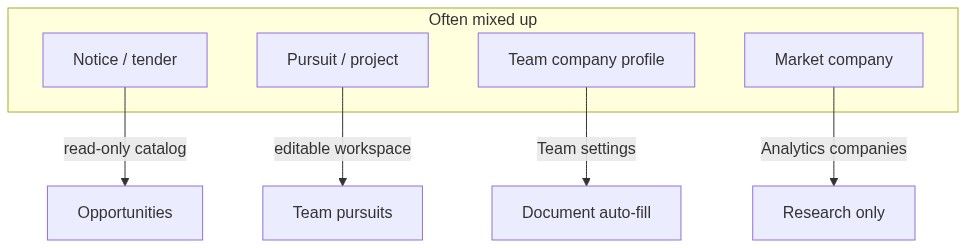
Notice = authority's publication (read-only). Pursuit = your team's bid workspace (editable).

Tender vs notice

Same catalog object; tender wording on detail/chat, notice in Opportunities nav.

Pursuit vs project

Same workspace; project is translation/assistant variant.

Team vs market company

Team = your workspace. Analytics β†’ Companies = competitor intelligence.

Company profile vs organisation

Profile = legal fields in settings. Organisation = onboarding label for the business entity on the team.

Home vs Dashboard

Home = assistant. Analytics β†’ Dashboards = custom statistics boards.

Alert vs notice

Alert = your saved search rule. Notice = one matched opportunity.

Team product vs tender product

Team product = your catalog. Tender product = buyer requirement extracted from notice PDFs.

Product category vs requirement category

Product = inventory. Requirement = compliance taxonomy in questionnaires.

Participant vs team member

Participant = bidder on a public procedure. Team member = colleague in your workspace.

Owner (team) vs pursuit owner

Team owner = can delete team. Pursuit owner = accountable member on one bid.

Reference ID vs identifier

Reference = Tendersight internal. Identifier = official notice number from source.

Opportunities vs Analytics

Opportunities = act on tenders today. Analytics = study market history.

Active team vs team on dashboard

Active team = sidebar switcher. Dashboard team visibility = who can view that analytics board.

Flow diagram

Pursuit status and pipeline (kanban)

Label

Typical meaning

Draft

Early setup β€” not yet in active bid work

In progress

Active preparation

Submitted

Your team marked external submission complete

Won

Award outcome favorable to your team

Lost

Award went elsewhere or you withdrew

Archived

Closed without active work

Exact column names may vary slightly by team workflow configuration on the pursuits board.


AI and quality labels

Term

Meaning

AI-generated content

Disclaimer on assistant and extraction output β€” verify before reliance.

Extraction run

Single in-depth analysis or product extraction job.

Confidence

Internal scoring on some mappings β€” treat as hint, not approval.


FAQ

Are "notice" and "tender" different objects?

No. Same read-only catalog record. Navigation favors notices; detail pages and chat often say tender.

Are "pursuit" and "project" different objects?

No. Same team workspace. Pursuit is the primary English UI label.

What does "company" mean in a sentence?

If the path is Team β†’ Settings, it is your legal profile. If Analytics β†’ Companies, it is market research about a bidder.

What is a "lot"?

A slice of a procedure you can bid separately. Multi-lot notices show a Lots section on the notice detail page.

What is CPV?

EU product/service classification code used in filters, alerts, and statistics.

What is Lead Finder?

The branded notice browse experience β€” not a separate product from Notices.

What is a ruleset?

The saved filter definition behind an alert.

What is strategic gap?

Analytics comparing your team profile's wins to a competitor's β€” requires fiscal ID match in settings.

What is an SME in the questionnaire?

Subject Matter Expert β€” a teammate assigned to review specific requirements.

Why does the assistant say "project"?

Localization or conversational phrasing for pursuit. Treat as the same workspace under Team β†’ Pursuits.

What is "standalone" on the pursuits board?

Pursuit created without linking to a catalog notice β€” you entered context manually.

What is the decision band?

The four summary tiles at the top of Notice overview for quick bid/no-bid scanning.


  • Platform overview

  • Core concepts

  • How information flows

  • Permissions and access

  • Notice (Tender)

  • Pursuit

  • Team

  • Company (two meanings)

  • Notices browse

  • Market statistics