Team product
Overview
A team product is an item in your team's inventory catalog — something you sell or can deliver on a tender. Products power technical offer building, AI automapping against requirements, datasheet evidence in attribute mapping, and quotation import workflows.
Team products are your offerings. They are not the same as tender products on a notice — items the contracting authority requires, extracted read-only from tender documents. Your catalog lives under Team → Inventory → Products; authority requirements appear on Notice → Products.
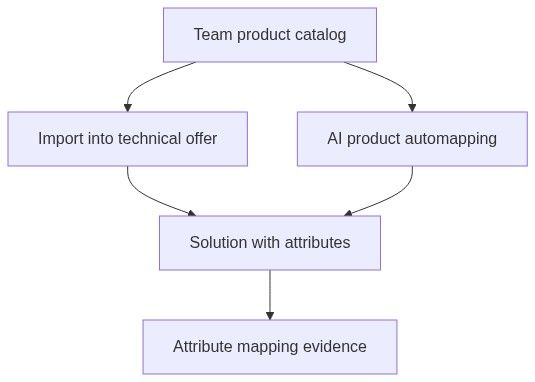
Maintaining an accurate catalog before pursuit work pays off: importing from inventory into a technical offer copies specifications into solution attributes, and AI product automapping searches your catalog when matching compliance requirements.
Tip: Before you rely on automapping in a pursuit, confirm you have:
At least one product with technical specifications (not name-only rows)
Categories assigned — optional business knowledge text improves AI matching
Datasheet PDFs uploaded where available for evidence in attribute mapping
Synced inventory up to date if you use WooCommerce, GoMag, or CSV feeds
Important: Deleting a team product removes it from the team's catalog and from pursuits where it was used. Synced products (WooCommerce, GoMag, external feeds) cannot be deleted from the UI — manage them at the integration source.
Team product vs tender product
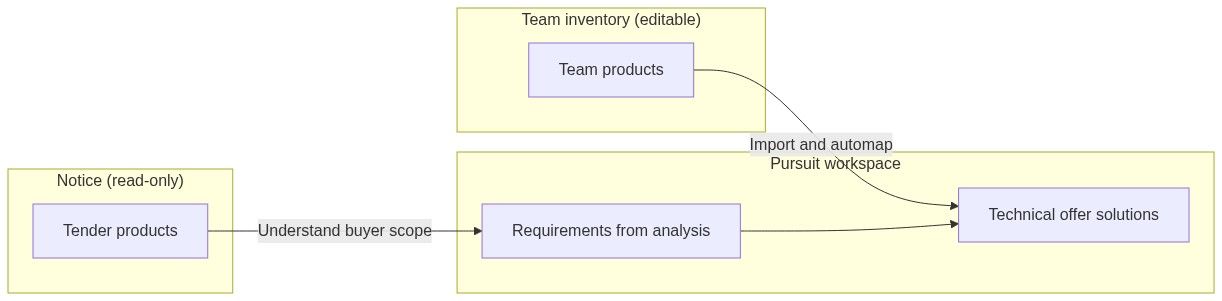
Typical workflow: review tender products on the notice → create pursuit → run in-depth analysis → import or automap team products in Technical offer.
See Notice products for the authority side.
Where team products appear
The products list shows source badges, price, category, and row actions. Click a row to open the content sheet for edit. View specifications opens the rich datasheet page with PDF highlights when a datasheet exists.
Key fields and where they matter later
Source badges
Caution: Financial offer modules do not automatically pull team product unit prices in all workflows. Confirm pricing with your internal bid process; catalog prices are primarily commercial context for technical offer work.
How to add products — choose a path
Open Team → Inventory → Products → New product to reach the New team product hub. Each card starts a dedicated workflow:
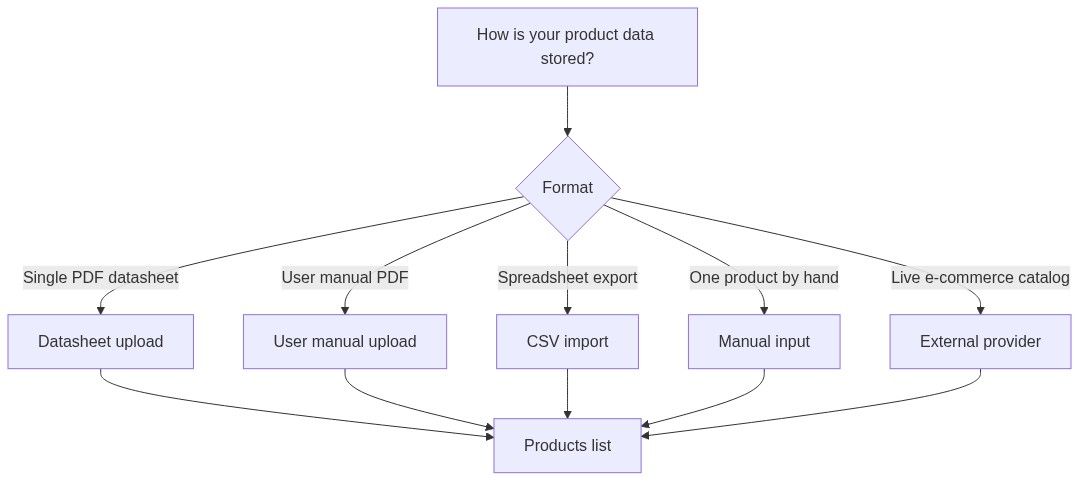
CSV import essentials
Four-step wizard: Upload file → Map columns → Assign categories → Review & process.
Required mapped columns: Product name, Description
Optional: SKU, unit price without VAT, currency
Unmapped columns become specification attributes automatically
See CSV import for the full column-mapping rules.
Background processing
Multi-file jobs (datasheets, manuals, large CSV batches) appear in the Product uploads panel with progress status. Wait for completion before automapping in a pursuit if you need the new SKUs.
Product categories
Team → Inventory → Product categories
Categories are flat (not hierarchical). Use bulk assign category on the product list to recategorize many rows at once.
Empty state: "Create your first product category to organise your team products."
Actions on products
Deletion warning in product: removing a product deletes it "from the team's product list and all associated information where it is used in any of your pursuits."
Synced products cannot be deleted from the UI — update or remove them via WooCommerce, GoMag, or the feed configuration under Team → Integrations.
Where products are used in pursuits
Import from team inventory
In Pursuit → Technical offer, when building a solution:
Choose import from inventory.
Search and select catalog products.
Technical specifications copy into solution attributes.
The solution links back to the team product for traceability.
AI product automapping (auto-solver)
Requirements exist from in-depth analysis or questionnaire import.
AI searches your catalog specifications and category business knowledge.
Candidates appear with match scores and reasoning.
You apply a candidate to create or update the solution.
Empty or name-only products produce weak matches — add specifications first.
Attribute mapping
When a solution came from a team product, datasheet PDF references can flow into requirement–solution attribute mapping for evidence in proposals.
Product quotation import (related)
Team → Settings → Product quotation sources configures external quotation systems. This is separate from the static catalog but used in technical offer quotation import mode.
Relationship to other entities
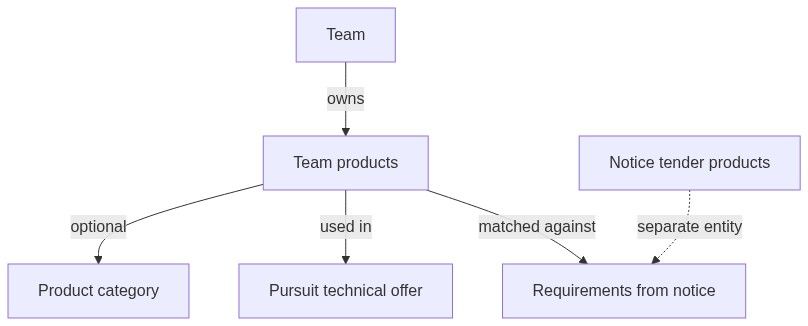
Team products do not carry CPV codes. CPV appears on notices and alerts, not on catalog rows.
Permissions and limits
Team members with access to Team → Inventory → Products can manage the catalog subject to:
Subscription limits on AI processing (datasheet extraction, automapping)
E-commerce sync entitlements on integrations
Seat and team membership (must be a member of the owning team)
Empty and error states
Recommended workflow (catalog → pursuit)
Create categories with business knowledge for your main product lines.
Import catalog — CSV for bulk, datasheets for spec-rich lines, integration for live shop.
Review specifications on high-runner SKUs.
Create pursuit from notice or standalone.
Run in-depth analysis to populate requirements.
Technical offer — import inventory or run automapping.
Attribute mapping — attach datasheet evidence where required.
See First pursuit workflow.
FAQ
What is the difference between team product and tender product?
Tender products are what the authority asks for (extracted from notice documents, read-only). Team products are what you offer in your inventory.
Do team products have CPV codes?
No. CPV codes appear on notices and alert rules, not on catalog products.
Can I use the same catalog product in multiple pursuits?
Yes. Import the same team product into many technical offers across different pursuits.
Why can I not delete a WooCommerce product?
Synced products are owned by the integration to prevent catalog drift. Update or remove them in WooCommerce (or disconnect the sync).
Why does automapping find nothing?
Common causes: empty technical specifications, wrong or missing category, or requirements not yet extracted. Add specs and optional category business knowledge, then retry.
Does unit price flow into financial offer automatically?
Not reliably across all modules. Treat catalog price as reference; confirm financial offer pricing with your bid process.
What CSV columns are required?
Product name and Description. Other columns are optional or become specifications when unmapped.
Where do I sync WooCommerce or GoMag?
Team → Integrations → Connected services, or New product → External provider on the hub.
Related articles
Team
Pursuit
Notice (Tender)
Notice products
New product hub
CSV import
Products list
Product quotation sources
How information flows
Was this helpful?
Still need help? Ask the team