Company statistics (Analytics)
Overview
Company statistics summarizes a market company's procurement footprint on their analytics profile — participation counts, win rate, total award value, CPV distribution, regional coverage, activity trends, and (when your team fiscal ID matches) strategic gap and head-to-head comparisons. Use it to quantify competitors and benchmark your own public track record before bid/no-bid meetings.
All metrics are read-only aggregates from synced publications. They do not include your team's private pursuit pipeline unless your legal entity appears in official participant data.
Tip: Before presenting charts to leadership, confirm you have:
Selected the same year and currency across all tabs you screenshot
Noted the as of snapshot date on KPI headers
Completed Company profile if you need Strategic gap vs. your team
Opened Company tenders to validate outliers (one mega-tender skews averages)
Important: Statistics inform strategy; submission deadlines live on individual Notice overview pages. Never skip notice-level validation.
Statistics vs other company profile tabs
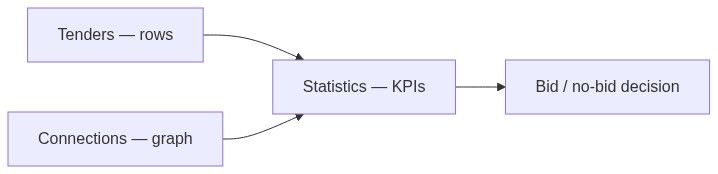
How to open
Analytics → Companies → Companies directory.
Click company name.
Select Statistics tab.
URL may support tab query params for deep links — share with colleagues after filters are set.
Header controls
Summary KPI section loads below controls before tabbed or scrolled content.
Summary KPIs (typical)
Tooltips on cards explain formulas — hover before quoting in executive decks.
Chart and table sections (typical)
Sections use deferred loading — loading placeholder until scrolled into view or tab activated.
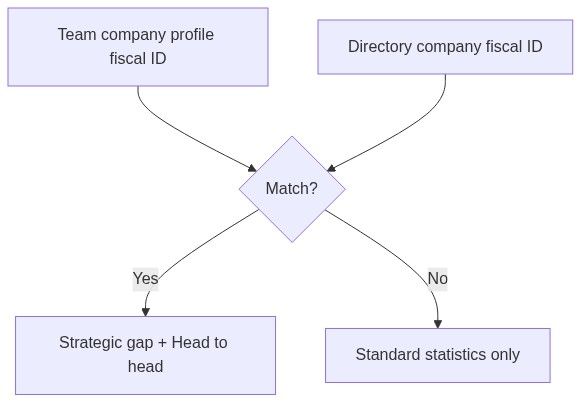
Strategic gap and head-to-head (fiscal match)
When your team's company profile fiscal identifier matches this directory company or you view a competitor while your team is matched elsewhere:
Without fiscal match, these sections are hidden or show sign-in prompts. Fix VAT/registry in team settings first.
Numbered workflow — competitor benchmark
Open competitor → Statistics.
Set year to trailing 3 years.
Record win rate and top 3 CPVs.
Open Top contracting authorities → click buyer → Authority statistics.
Switch to Head to head (if available) against your matched company.
List notices to avoid price wars → Company tenders filter by authority.
Numbered workflow — "our company" public footprint
Ensure team settings fiscal ID is correct.
Find your company on directory (search name + fiscal filter).
Statistics tab — treat as public track record mirror.
Compare with Team overview competitive widgets.
Use Strategic gap to prioritize CPV expansion or authority targeting.
Relationship to market statistics
National growth does not guarantee one competitor's share — use both.
Relationship to pursuits
Statistics do not update when you work inside a pursuit. When you win a new contract, the directory updates after official award publication syncs — not when you move kanban to Won.
Permissions
Edge cases
What you cannot do
Adjust win counts after disputed awards
Import private revenue figures
Push statistics into pursuit pricing
Create alerts from win rate alone (use notice-based alerts)
FAQ
Why doesn't statistics match my internal CRM?
Directory uses public procurement awards only.
How is win rate calculated?
See card tooltip — typically wins ÷ participations with published outcomes.
Can I compare two arbitrary companies?
Use Main competitors section and open each profile. Direct dual compare is via Head to head with your matched team company.
Why is strategic gap empty?
Fiscal ID mismatch — update Company profile.
Do lost bids count in participated?
Yes, when publication lists them as participants pre-award.
How fresh is the data?
Snapshot date on header — sync schedule from official sources.
Related articles
Companies directory
Company tenders
Company connections
Market statistics
Company (entity)
Company profile
Was this helpful?
Still need help? Ask the team