Company
Overview
In Tendersight, "company" means two different things. New users often open the wrong page because both labels appear in everyday language. This article explains both meanings, when each matters, and how they connect when your team's fiscal identifier matches a record in public procurement data.
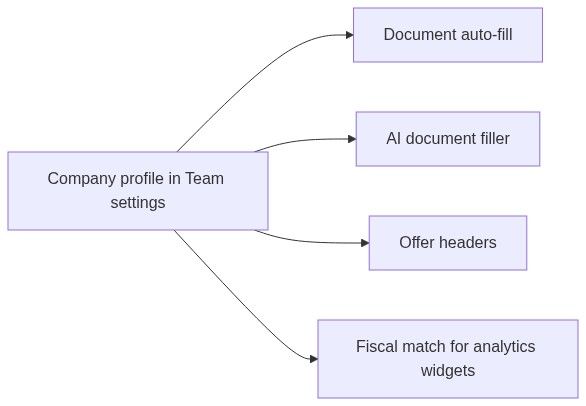
Your company profile is the legal entity behind your team — VAT, address, registry numbers — that you edit under Team → Settings. It powers document auto-fill, offer headers, and AI-assisted form filling in pursuits.
A market company is any organization that appears as a participant in tender data — competitors, consortium partners, incumbents. You research market companies under Analytics → Companies; you cannot edit those records.
Tip: Use this quick check before you continue:
Team → Settings → you need to edit your organization's legal data
Analytics → Companies → you need to research a bidder or supplier
Notice → Participants → link opens a market company profile (read-only)
Important: Completing Team → Settings (company profile, legal representative, banking) is required before your first pursuit if you want generated documents to include real legal data instead of "complete" placeholders.
The two meanings — decision guide
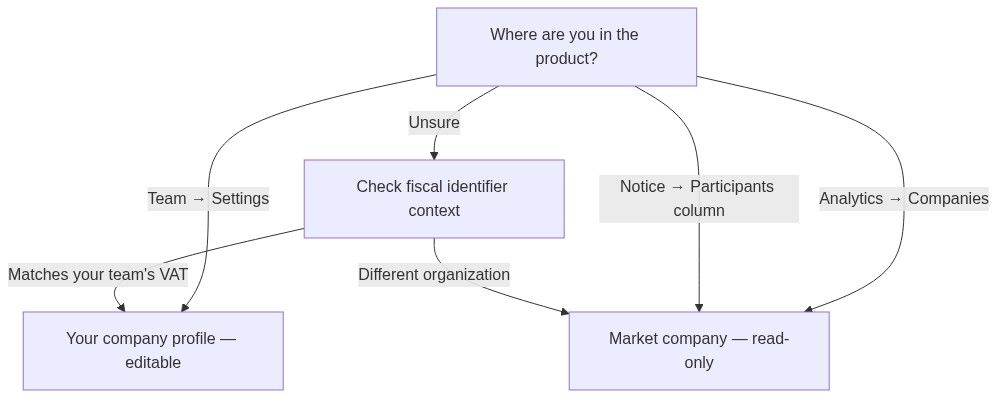
Caution: Team settings = yours. Companies directory = market research. Do not expect to change a competitor's VAT or address from Analytics — those records sync from official publications.
Part 1 — Your company profile (team settings)
The company profile stores who your bidding entity is on paper:
Registered legal name and headquarters address
Contact details — phone, fax, email
Trade registry, registration number, and VAT (fiscal identifier)
It lives inside Team → Settings, not as a separate top-level page. The section title is Company profile, with the subtitle: "General information regarding the legal entity that is behind this team."
Why it must be done before creating a pursuit
When you create a pursuit, Tendersight immediately prepares bid outputs that reference your organization:
"Team settings complete" means all three sections saved at least once:
Company profile
Legal representative
Banking information
See Legal representative and Banking information.
How to open company profile
Key fields and downstream use
Part 2 — Market company (Analytics)
A market company is any organization that appears in indexed procurement data as a tender participant — winner, bidder, or consortium member. Tendersight aggregates participation history from official European sources (SEAP, TED, national portals).
How to open the directory
From the Companies directory you can filter by keywords, country, fiscal identifier, won amount, won count, and relationship with a specific contracting authority.
Company profile tabs
Click a company name to open its profile. Inner navigation:
When to research a market company
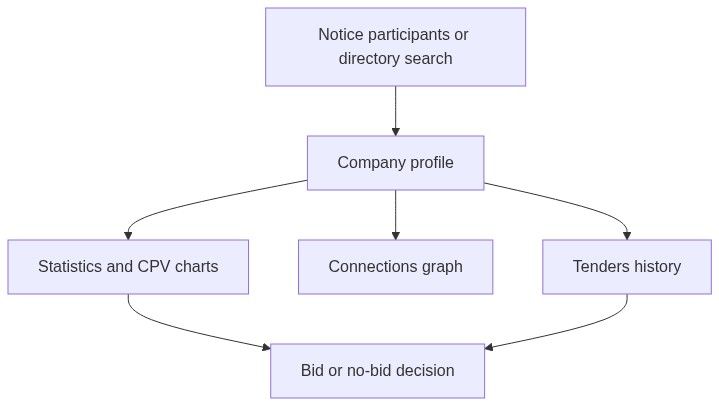
Tip: From Notice participants, the Company column links directly into a market company profile — useful right after award when you want to see who won and their track record.
Linking both meanings — when your team matches the directory
When your team company profile fiscal identifier matches a market company record in the directory:
Team overview competitive widgets can personalize
Company statistics Strategic gap tab compares your wins vs competitors (not shown when viewing your own company page as the active team's identity)
Custom dashboard head-to-head widgets align with your legal entity
When there is no match:
Market research still works — browse any company
Personalized gap analysis and "our company" widgets may not activate
Fix by ensuring VAT in Team → Settings matches the identifier on your official registrations
Company on notices vs company in settings
Recommended research workflow (market company)
Discover — notice participants, directory search, or authority Companies tab.
Validate — confirm fiscal identifier and country match the organization you care about.
Review tenders — recent wins, CPV patterns, contract types.
Check connections — consortium habits, preferred partners.
Read statistics — positioning vs your team's fiscal match when available.
Decide — bid/no-bid, pricing posture, partnership outreach.
Analytics informs decisions; pursuits execute them. Opening a company profile does not create a pursuit.
Permissions snapshot
Full matrix: Permissions and access.
What you can do (and what you cannot)
You can
Edit your team's company profile, legal representative, and banking
Search and filter the companies directory
Drill from notices, authorities, and dashboards into market profiles
Use statistics for bid/no-bid and competitive positioning
You cannot
Edit a market company's name, VAT, or win history
Create a market company record manually
Use Analytics → Companies to fix document auto-fill — use Team → Settings
Merge two market company rows — disambiguate with fiscal identifier
FAQ
What is the difference between company profile and market company?
Company profile is your team's legal identity you edit in settings. Market company is a read-only intelligence record built from public tender participation data.
Where do I set our VAT code?
Team → Settings → Company profile → edit sheet. Not under Analytics.
Why does strategic gap not appear for our company?
Your team fiscal identifier may not match any directory record, or you are viewing your own company page in a context that hides self-comparison. Confirm VAT in settings matches official registration.
Can I edit a competitor's profile?
No. Market companies sync from official sources. Research only.
Does company profile affect alerts?
Indirectly — alerts match notices, not company profiles. Accurate team settings affect documents and offers inside pursuits.
How do I get from a notice to a company profile?
Open Notice → Participants (after award or when published) and click the Company name. Or search Analytics → Companies by name or fiscal ID.
Is organisation (onboarding) the same as company profile?
Organisation captures initial business context at signup. Company profile is the persisted legal fields in settings used for auto-fill. Complete the profile in settings even if onboarding collected a name.
Do collaborators edit company profile?
Team members with access to Team → Settings can edit profile sections. Restrict sensitive updates through your internal process — the product does not split profile fields by role beyond team membership.
Related articles
Company profile
Companies directory
Company tenders
Company connections
Company statistics
Team
Contracting authority
Notice (Tender)
How information flows
Core concepts
Was this helpful?
Still need help? Ask the team