Pursuit overview
Overview
Pursuit overview is the home page inside a pursuit workspace — your team's command center for one bid. It shows completion progress, editable context (deadline, type, country), linked notice summary, team members on the pursuit, and recent activity. Navigation to questionnaire, offers, documents, and checkup uses the pursuit sidebar, built dynamically from pursuit type and country configuration.
Whether you created the workspace from a notice or via standalone wizard, overview is where you confirm context is correct before expensive AI analysis and compliance work. Wrong country or pursuit type means wrong sidebar modules and wrong standard forms.
Tip: On first open, confirm you have:
Correct active team in the sidebar (multi-team accounts)
Pursuit type (works, supplies, services) matching the tender
Country matching form volumes and legal context
Owner assigned for kanban accountability
For notice-backed pursuits: latest notice version reviewed on linked tender card
Important: Pursuit data is independent after creation. Authority amendments update the notice on sync — not your questionnaire. Review Notice versions and update bid content manually.
Pursuit vs notice vs project
See Pursuit (entity) and Notice (Tender).
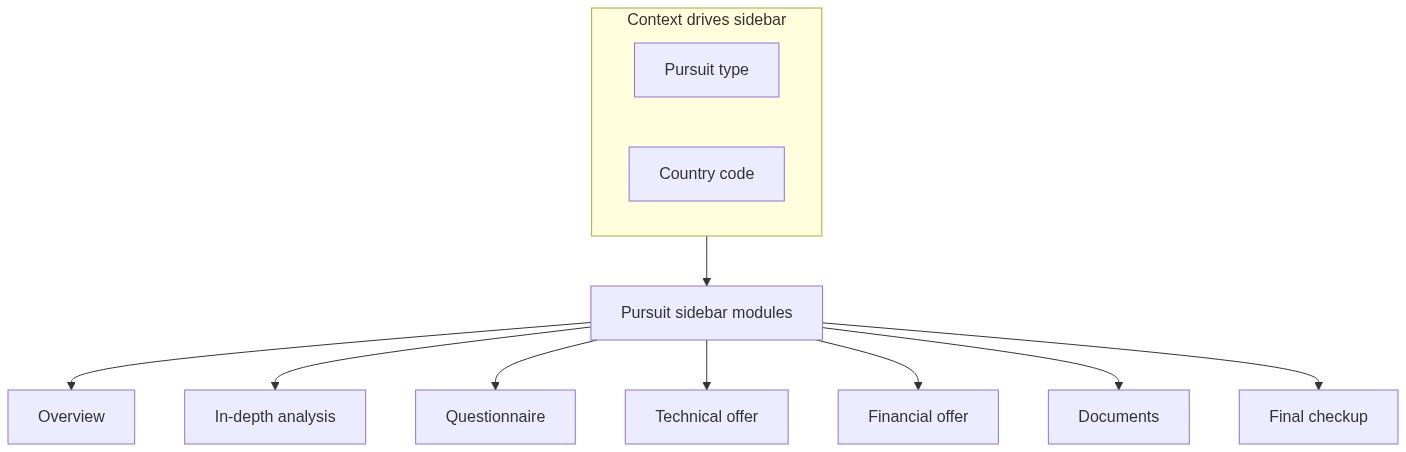
Not every module appears for every pursuit. A works contract in Romania differs from a supplies pursuit in Finland — country pursuit profiles control activation.
How to open
Dynamic navigation and incomplete context
If context is incomplete (missing country or pursuit type), an empty state or alert prompts you to fill fields before modules unlock fully.
Fix on overview Context details before In-depth analysis.
Page sections
Pursuit completion
Progress ring and qualificative badge summarize completeness across active modules.
Synced with Final checkup on refresh — re-open checkup after major edits.
Context details
Editable fields (inline or sheet depending on field):
Caution: Changing type or country mid-pursuit does not migrate already-generated documents. Regenerate forms after context fixes.
Linked notice (notice-backed pursuits)
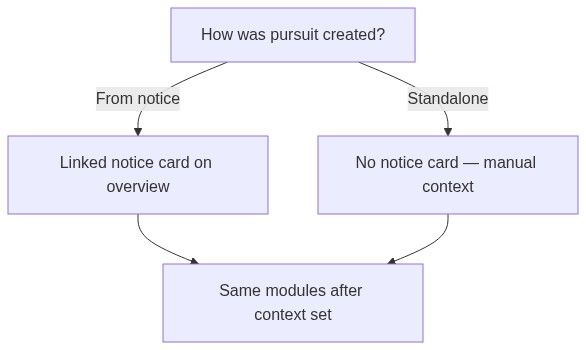
Tender summary card links to Notice overview.
Standalone pursuits omit this block — Source: standalone on kanban.
Team members
Avatars of members involved; manage pursuit-level collaboration. Distinct from Team members roster — pursuit membership controls who sees this workspace.
Activity timeline
Chronological log — analysis completed, document uploaded, status changes. Audit trail for bid managers.
Standalone vs notice-backed
Numbered workflow — first hour in a new pursuit
Open overview — verify type and country.
Assign owner and add pursuit members.
Notice-backed: open linked notice → download documents.
Upload any missing PDFs to Documents library.
Start In-depth analysis or skip if small RFP.
Skim sidebar — note which modules your country profile activated.
Follow First pursuit workflow phases.
Downstream dependencies
Permissions
Team members with pursuit access can view overview. Editing context may require owner or admin role depending on team policy.
Edge cases
FAQ
What is the difference between pursuit and project?
Same workspace. Project appears in some translations; pursuit is primary English in Team → Pursuits.
Can I attach a standalone pursuit to a notice later?
No. Create a new notice-backed pursuit if the tender appears in catalog.
Why is financial offer missing?
Set pursuit type on overview first.
Does overview update when the authority amends the tender?
Notice card may reflect sync; your questionnaire does not auto-update.
Who sees completion progress?
All pursuit members with module access.
Can two teams share one overview?
No — one pursuit per team per notice maximum.
Related articles
Pursuit (entity)
Create pursuit from notice
Create standalone pursuit
First pursuit workflow
Final checkup
Notice (Tender)
Was this helpful?
Still need help? Ask the team