Market statistics
Overview
Market statistics shows aggregate public procurement metrics — notice volumes, estimated and awarded values, trends by CPV division, regional distribution, and top participating companies — for strategic planning without opening individual notices. The page is curated: Tendersight maintains the default charts and KPI tiles; you filter scope but do not rearrange the layout like Custom dashboards.
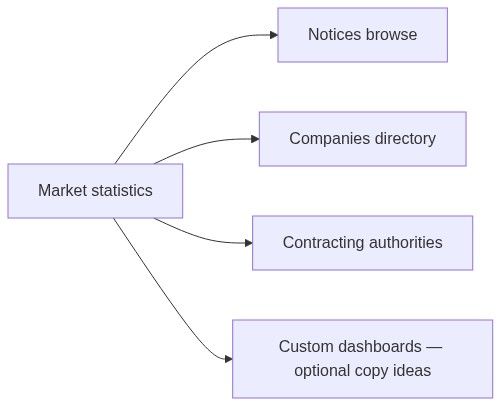
Use market statistics when you need a fast national or segment-level picture before diving into Browse notices, Companies directory, or buyer profiles on Contracting authorities directory.
Tip: Before a quarterly review, confirm you have:
Selected the correct country (or multi-country if supported)
Aligned year or date window with your fiscal planning period
Chosen currency display if you compare cross-border value
Noted the as of snapshot date on KPI headers
Bookmarked one Custom dashboard if you repeat the same slice weekly
Important: Market statistics is read-only. It does not create pursuits, edit notices, or show your team's private pipeline. Execution lives under Team → Pursuits.
Market statistics vs custom dashboards
How to open
Open the app sidebar.
Expand Analytics.
Click Market statistics.
The page loads overview summary first, then interactive charts as you scroll or switch sections.
Page content and dimensions
Typical controls
Controls update after you pause typing.
Typical visualizations
Exact cards depend on data availability for your filter set. Empty sections mean insufficient indexed history — widen year or country.
Numbered workflow — quarterly market review
Open Analytics → Market statistics.
Set country to your primary operating market.
Set year to the closing quarter (or trailing twelve months if available).
Note overview KPIs — compare to prior quarter from memory or screenshot archive.
Open CPV breakdown — confirm your team's focus categories still represent opportunity.
Click a top company row → Companies directory profile for competitor depth.
Click a high-volume authority if shown → Contracting authorities directory.
Optional: create Custom dashboard widgets mirroring filters you will reuse.
Drill-down paths
Drill-down does not create a pursuit. After validating opportunity, open the notice and click Create pursuit.
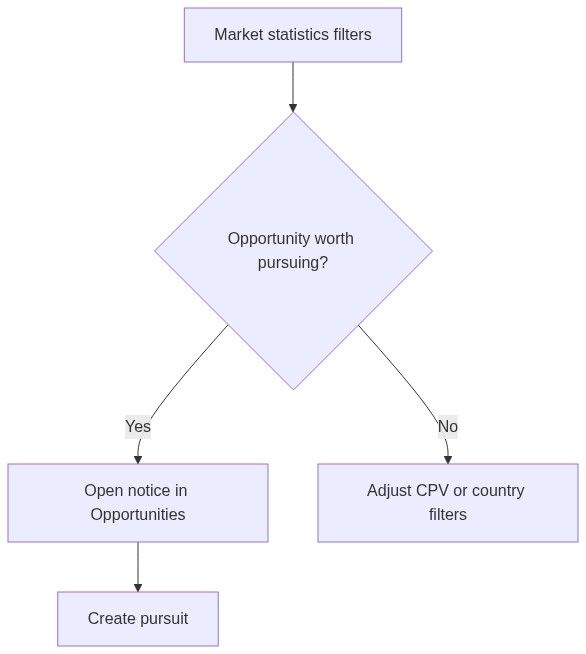
Relationship to notices and pursuits
Aggregates can include tenders you are not bidding on. Your active work appears only on Team → Pursuits.
Export and reporting
There is no substitute for checking submission deadline on notice overview before bid decisions — aggregates do not show actionable deadlines per row.
Permissions
Guests may see reduced cards. Sign in for complete statistics.
Edge cases
Recommended pairing with Opportunities
Market statistics — size the segment (bid/no-bid at macro level).
Alerts — automate new notice discovery in that segment.
Notices browse — evaluate individual opportunities.
Pursuit — execute on selected tenders.
See First pursuit workflow after you create a workspace.
FAQ
Does market statistics include my team's wins?
It includes public award data from official publications, not your internal pipeline unless your company appears as a market participant in synced data.
Can I save filter presets on this page?
Use Custom dashboards for saved layouts. Market statistics filters are typically session-based unless URL query params are bookmarked.
Why do values differ from notice estimated value?
Charts sum or average many notices; a single notice row shows one publication's field.
Is data real-time?
No. Imports run on a schedule from official sources.
How do I find one contracting authority's habits?
Use Contracting authorities directory → Statistics for buyer-specific depth beyond national aggregates.
Can I create an alert from market statistics?
Not directly — configure Opportunities → Alerts with CPV and country matching your market statistics filters.
Related articles
Browse notices
Dashboards list
Companies directory
Contracting authorities directory
Notice (Tender)
Company (entity)
Was this helpful?
Still need help? Ask the team