Content library
Overview
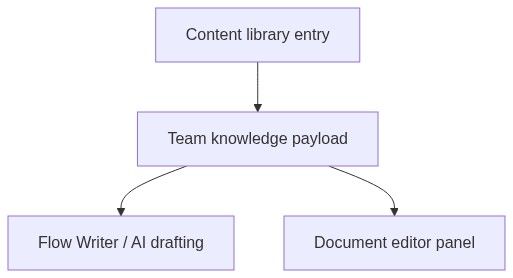
The content library stores reusable phrasing from past bids — executive summaries, methodology paragraphs, compliance statements, and boilerplate you trust. Your team and Flow Writer / document editor AI pull from these entries when drafting new submissions, keeping tone consistent and reducing rewrite time.
Entries are team-scoped — not shared across teams. Distinct from Document templates (structured layouts with variables) and from Human resources (people profiles).
Tip: Before a major pursuit, confirm you have:
Captured winning paragraphs from your last similar bid
One theme per entry (better AI retrieval than mega-pastes)
Accurate source labels for provenance
Pruned outdated regulatory phrasing after legal changes
Tested retrieval via document editor Content library panel
Important: Content library does not replace tender-specific compliance — always adapt snippets to current requirement text.
How to open
Team → Knowledge → Content library
Page header:
Toolbar: Search (Search content library entries, update after you pause typing.
Why it matters
Info alert on page:
"Store high-impact phrasings from previous bids here. Your team and Flow Writer reuse them as knowledge when drafting new submissions."
Entries table
Pagination when collection spans pages.
States
Create entry — sheet
From New entry or empty-state CTA.
Fields
Footer: Cancel | Save entry (creates row and refreshes table).
Edit entry — sheet
Same fields pre-filled. Title: Edit content library entry.
Numbered workflow — build library from won bid
Open won pursuit documents in editor.
Copy high-quality methodology paragraph.
Knowledge → Content library → New entry.
Paste text; set source = pursuit excerpt if applicable.
Save.
Repeat per theme (quality, SLA, security, etc.).
In new pursuit, open document editor → content library panel → search and insert.
How content is used
Content library vs document templates
Best practices
Store winning paragraphs — not entire 40-page PDFs in one entry
Tag source accurately for editors auditing provenance
Keep entries focused — one theme per row
Review after regulatory changes (GDPR, procurement law)
Do not store confidential third-party text without rights
Permissions
Team members with knowledge access can view. Create/edit may require administrator per team policy.
Edge cases
FAQ
Can the assistant search entry text?
Yes — tools can list and read content library for active team.
Same as document templates?
No — snippets vs. structured templates.
Cross-pursuit automatic insert?
Manual or AI retrieval — not auto-injected on pursuit create.
Character limit?
Practical limit per UI — split long text across entries.
Delete entry?
Edit sheet or row action — irreversible for team.
Export library?
No bulk export in standard UI — copy entries as needed.
Related articles
Document templates
Human resources
Document editor
Working with AI assistant
Team overview
Was this helpful?
Still need help? Ask the team