Delete team
Overview
Delete team permanently removes a team and all data scoped to that team — pursuits, pursuit documents, products, human resources, integrations, alert activity, scheduled tasks, and member associations. Only the team owner can perform deletion. The action is irreversible.
Deletion is appropriate when a workspace was created by mistake, a client engagement ends and data must be purged, or a legal entity no longer bids under that team. When the workspace should continue under another lead, prefer Transfer ownership instead.
Tip: Before you delete, confirm:
You exported or archived pursuits and documents your organization must retain
No colleague still depends on this team for active bids
External integrations (WooCommerce, GoMag, etc.) are disconnected per IT policy
You typed the exact team name in the confirmation field — spelling and capitals matter
You intended permanent removal, not a pause (there is no trash bin)
Important: Other teams on your account and your user identity are not deleted. Only the selected team and its scoped data are purged.
Who can delete a team
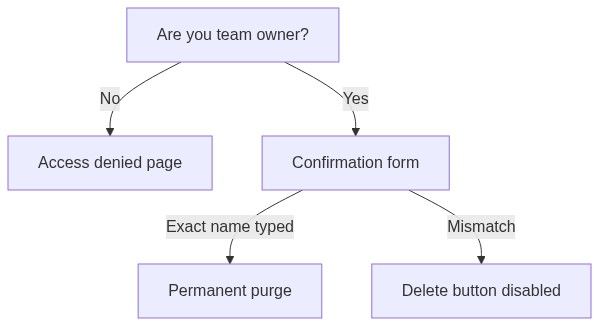
The Delete team item appears in team management navigation only for the owner who passes authorization checks.
How to open delete team
Switch to the team you intend to destroy in the sidebar team switcher first — deletion always targets the active team context.
Access denied state
If you are not the owner:
Alert: You do not have access to team deletion
Explanation: "Only the team owner can access deletion details and permanently delete this team."
Button: Back to team dashboard → Team overview
Administrators who need the workspace removed must ask the owner to delete or transfer ownership first.
Deletion page — owner view
Warning alert
Amber Heads up! alert with two paragraphs:
"Deleting this team will permanently remove all associated data including pursuits, products, documents, and member associations."
"This action cannot be undone."
Read both before typing the confirmation.
Confirmation form
You must type the exact team name to enable deletion:
Validation: the typed string must match the team name exactly — including spelling, spaces, and capital letters.
The Delete team button stays disabled until the name matches.
Submit behavior
1. The team and its scoped data are permanently removed
2. On success:
- Toast: Team deleted — "The team has been permanently deleted."
- Redirect to Home
3. On failure:
- Toast: Failed to delete team with message
While deleting, the button shows Deleting and is disabled.
What gets deleted
Everything scoped to the team is purged across product modules:
Team├── Pursuits & pursuit documents├── Products & inventory├── Human resources & content library├── Connected services├── SME assignments & requirement categories├── Alerts & scheduled tasks└── Member associationsMembers lose access immediately; they are not deleted as users.
Before you delete — checklist
Export or archive pursuits needed for legal or audit retention
Download critical generated PDFs from open pursuits
Transfer ownership if someone else should keep the workspace
Cancel or disconnect external integrations if required by IT policy
Notify all members — they will lose access without warning if you skip this
Confirm no active subscription dispute or pending invoice you still need
Prefer Transfer ownership over delete when the workspace should continue under another lead.
Delete vs transfer — decision table
After deletion
You land on Home
The team disappears from your team switcher
Former members no longer see the team in their list
Pursuit links shared externally return not found
You cannot "restore" from Tendersight — recovery requires your own backups
If that was your only team, you may still create a new team via New team or use remaining memberships on other teams.
Edge cases
What you cannot do
Delete a team you do not own (even as Administrator)
Undo deletion or recover from a recycle bin
Delete only pursuits while keeping inventory (no partial team delete)
Delete another user's account from this page
Delete notices or analytics market data from team deletion
Permissions summary
FAQ
Can an Administrator delete the team?
No. Only the owner.
Can I undo deletion?
No. Data is permanently removed from Tendersight.
What happens to my account?
Your identity remains. You are simply removed from the deleted team.
What about personal teams created at registration?
Same rules — owner confirmation with exact team name.
Are files on my computer deleted?
No. Only data stored in Tendersight for that team.
Does deletion cancel subscription automatically?
Billing follows your plan's rules; resolve open invoices if deletion fails.
Troubleshooting
Related articles
Transfer ownership
Team overview
Team members
Team entity
Create team
Was this helpful?
Still need help? Ask the team