Transfer ownership
Overview
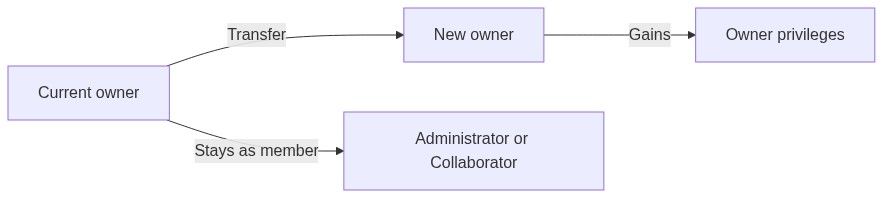
Transfer ownership lets the current team owner hand administrative control to another member. You remain on the team after transfer, but lose owner-only privileges — deleting the team, transferring ownership again, and other actions reserved for the single owner role.
Ownership is distinct from Administrator. Many teams have several administrators who manage settings and members; only one person is owner at a time.
Tip: Before you transfer, confirm:
The successor is already a team member (invited and accepted)
They understand billing and subscription responsibility for this team
Company profile and banking are current — the new owner inherits the workspace as-is
You no longer need to delete the team or transfer again (only the new owner can)
Transfer is the right tool when you step back from bid leadership but stay as a contributor, or when you created a team for someone else and want to hand it over permanently.
Important: Transfer is one-way from your perspective. After you transfer, only the new owner can transfer again or delete the team.
Owner vs administrator — what changes
After transfer, your member roles (e.g. Administrator, Collaborator) stay as they were — you only lose the owner flag.
When to transfer (and when not to)
Good reasons
You are leaving bid management but staying on the team
A colleague should become the primary billing and admin contact
You provisioned a team for a client and want them to own it
Your account will be deactivated and someone else must retain the workspace
Prefer other actions instead
Caution: Transfer does not copy pursuits to another team. The workspace continues under the same team key with a new owner.
How to open transfer ownership
The menu item appears only when all of the following are true:
You are the team owner
You have Administrator access (owners typically do)
At least one other team member is eligible as a new owner
If no eligible members exist, the page shows guidance to invite members first.
Non-owners never see this navigation item.
Page layout
Header
Loading states
Empty states
Transfer form
When eligible candidates exist, a single-field form appears:
Select the successor carefully — they immediately gain owner privileges on submit.
Footer button
There is no separate confirmation dialog beyond choosing the new owner and saving — treat Save changes as final.
What happens when you submit
1. Ownership moves to the selected member
2. On success:
- Toast: Ownership transferred — "Team ownership has been successfully transferred."
- Redirect to Team overview
3. On failure:
- Toast: Failed to transfer ownership with error description
- Form stays open for retry
The new owner immediately sees Delete team and Transfer ownership in management navigation. You no longer do.
Your pursuits, settings, and inventory are unchanged — only the ownership record updates.
```mermaid
sequenceDiagram
participant Owner as Current owner
participant Platform
participant NewOwner as New owner
Owner->>Platform: Save changes (new owner)
Platform->>Platform: Update owner record
Platform->>NewOwner: Owner privileges
Platform->>Owner: Member roles unchanged
Platform-->>Owner: Redirect to overview
```
Recommended handover workflow
Invite the successor if they are not yet a member — Team members
Ensure they accept and can open Team → Settings
Walk through billing and subscription if they pay the invoice
Document active pursuits and integrations externally if needed
Open Transfer ownership; select the successor; Save changes
New owner verifies Delete team / Transfer menu items appear for them only
Optional: previous owner asks to be demoted to Collaborator if admin access is no longer needed
Permissions summary
Administrators who are not owners cannot transfer or delete.
Edge cases
What you cannot do
Transfer to an email not yet on the team
Transfer to an external user without invitation
Undo transfer yourself after success (new owner must transfer back)
Split ownership between two people
Transfer only billing while keeping delete rights — owner is a single role
Best practices
Confirm the new owner understands billing and subscription responsibilities
Transfer before deleting your personal account if you are the sole owner
Invite and onboard the successor before transferring so they can manage settings immediately
Announce the change to the team so colleagues know whom to contact for billing
Export critical pursuit archives if your organization's policy requires retention after you leave
FAQ
Can I transfer to someone outside the team?
No. The new owner must already be a team member with an accepted invitation or membership.
Do I lose access after transfer?
No. You remain a member with your existing roles — you only lose owner-specific actions.
What if I am the only member?
The page shows No eligible members. Invite at least one colleague from Team → Users, then return.
Can the new owner remove me?
Yes, if they have member-management permission — same as any administrator.
Does transfer change company profile or VAT?
No. Legal settings stay on the team record.
Can I transfer back?
Only if the new owner transfers ownership to you.
Troubleshooting
Related articles
Delete team
Team members
Accept invitation
Team overview
Team entity
Create team
Was this helpful?
Still need help? Ask the team