Products list
Overview
The Products page is your team's inventory catalog — every product or service you might offer on tenders. Maintain it before pursuing technical offers so AI automapping, attribute mapping, and financial offer import have specifications to match against authority requirements.
Each row is a team product: name, SKU, optional category, source origin, unit price, and technical/operational specifications. Products enter the catalog through five paths — manual entry, file uploads, CSV import, or connected e-commerce sync — all managed from this single list.
Tip: Complete inventory during onboarding (Team overview → Import inventory, step 4) before Start a pursuit:
Product categories created if you import at scale
At least one catalog path tested (new product hub)
Processing tasks panel clear or understood for AI imports
External sync usage under plan limit (text below search field)
Critical products verified in specifications viewer
Important: Deleting a product removes it from open pursuits where it was referenced. Bulk Delete all products is irreversible — review pursuits first.
Five paths into this list
All creation flows end here. Choose the path that matches your source data.
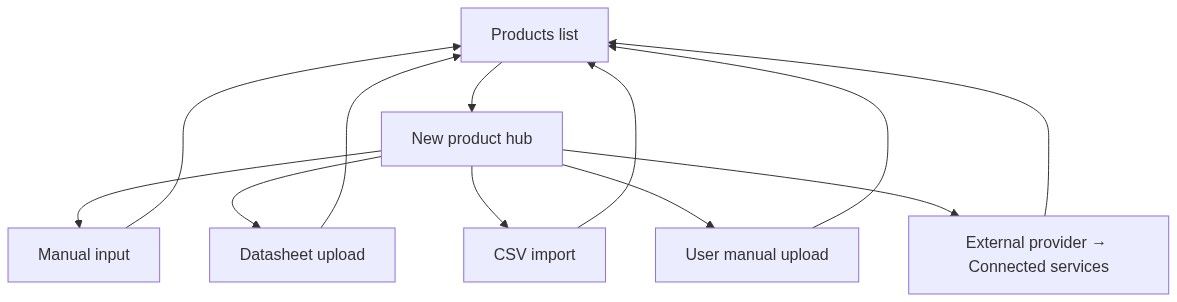
See New product hub for the decision tree.
Why inventory matters before pursuits
How to open
Page title: Products in {team name}
How data stays current
The list updates automatically when:
A teammate adds, edits, or deletes a product
A Processing tasks job finishes and the new product appears
A bulk delete is running (progress banner at the top)
You usually do not need to refresh the page manually.
Page header
Search column (left)
Actions (right)
Bulk buttons disabled during delete-all background job.
Bulk deletion progress banner
Red-tinted banner above list during delete-all:
Selection clears when bulk deletion starts. Completion toast: "All products removed from team!" Failure: "Failed to delete all products".
Main content priority
Loading placeholder — fetching
Error state — Retry
Empty state — no products
Processing tasks panel — active processing jobs
Products table — ≥ 1 product
Pagination — multiple pages
Note: Empty state hidden when processing tasks run — you see tasks panel even if table is empty.
Processing tasks panel
Collapsible Processing tasks — "Track pending and failed tasks." Default: expanded.
Task table
Processing tooltip: "We're analysing this product in-depth to ensure smooth integration with our features."
Task row menu
Completed tasks disappear when processing finishes; products appear in main table.
Products table
Sticky header; horizontal scroll on narrow screens.
Columns
Select-all supports partial state.
Row actions menu (⋯) — Product management
Delete confirmation: "This action cannot be undone. This will remove the product from the team's product list and all associated information where it is used in any of your pursuits."
Content sheet (side panel)
Row menu → Content. Title: product name. Subtitle: "Product information and details"
Read / edit modes
Edit (pencil) in header → footer Cancel / Save.
Save success: "Product updated successfully". Access denied if role blocks update.
Source badges
Manage synced products via Connected services.
Empty states
No products yet
Package icon — No products yet — "Add your first product to build your team catalog..." — New product CTA.
No search results
Package + search — No results — clear search to recover.
Permissions
\*May return Access denied toast.
Subscription gates
Recommended workflow
Categories — product categories.
Import — pick path on new product hub.
Monitor — Processing tasks until complete.
Verify — specifications viewer on key SKUs.
Pursue — technical offer import from catalog.
What you can and cannot do
You can
Search, bulk categorize, and bulk delete uploaded/manual products
Edit specs and datasheets via Content sheet
Watch automatic updates from teammates and jobs
Open specifications viewer for datasheet-backed products
You cannot
Delete WooCommerce/GoMag/feed rows from list (disconnect integration)
Recover bulk-deleted products
Edit notice buyer products here (team catalog only)
FAQ
Why no checkbox on some rows?
Synced external products — managed through integrations.
Search returns nothing but products exist?
update after you pause typing. processing tasks suppress empty state.
Content vs View specifications?
Content edits fields in side sheet. View specifications opens PDF + highlights.
What happens to pursuits when I delete?
Associated pursuit data for that product is removed — confirmation warns you.
Why does the list refresh alone?
live team channel keeps catalog synchronized.
External limit vs connected services limit?
External products counts synced SKUs. Connected services counts integration instances — both may apply.
Troubleshooting
Related articles
New product hub
Manual product create
Datasheet upload
CSV import
User manual upload
Product categories
Specifications viewer
Connected services
Team product entity
Team overview
First pursuit workflow
Was this helpful?
Still need help? Ask the team