Legal representative
Overview
The legal representative is the person authorized to sign bid documents and bind your organization in tender procedures — name, identity document, and domicile. Complete this section before creating your first pursuit, alongside Company profile and Banking information.
This is not a generic contact person field. Authorities expect the signatory on qualification forms to match the ID document you attach to the bid.
Tip: Before you save, confirm:
Forename and surname match the physical ID card or passport
Residence fields are filled (required for ID group to display correctly)
Document type, numbers, and dates match the scan you will upload
Expiry date is still valid for submission deadlines on active pursuits
Important: Legal representative is required for team settings complete. Partial saves — passport filled but residence empty — cause confusing read views. Save identity, document, and residence together.
Where to find it
Team → Management → Settings, fifth section in the grid.
Subtitle: "Information regarding the person representing this team in legal matters."
Read view — three groups
Unlike company profile (eight flat rows), legal representative organizes information into three clickable groups. Each group opens the same edit sheet when clicked, or use the cog icon in the section header.
Group 1 — Identity
If both forename and surname are empty: "No identity".
Group 2 — Identification document
Display quirk: This group only shows document content when residence (domicile) data exists. Passport details without residence may still show "No identification document" on the read view even though data is saved. Always complete Residence in the sheet.
When visible:
Issuer is editable in the sheet but not shown in the read view — still used in generated documents.
Group 3 — Residence
Domicile as comma-joined parts: street, street number, additional info, city, country.
Empty: "No residence".
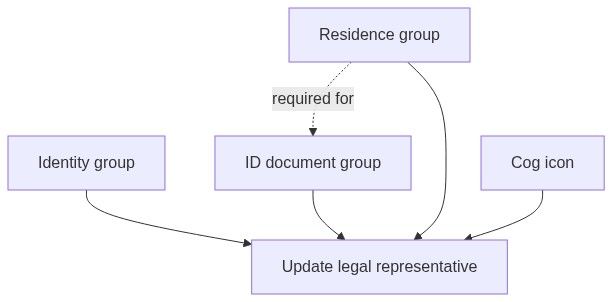
Edit sheet
Title: Update legal representative
Description: "Make changes to your team's legal representative here. Click save when you're done."
Wider sheet than company profile due to field count.
Subsection: Identity
Two-column grid for forename/surname; full width for others.
Subsection: Identification document
Document type dropdown:
National ID card
Passport
When National ID card:
When Passport:
Both types:
Subsection: Residence
All optional in client validation — but fill completely for forms and read view.
Save outcome
Where legal representative data is used
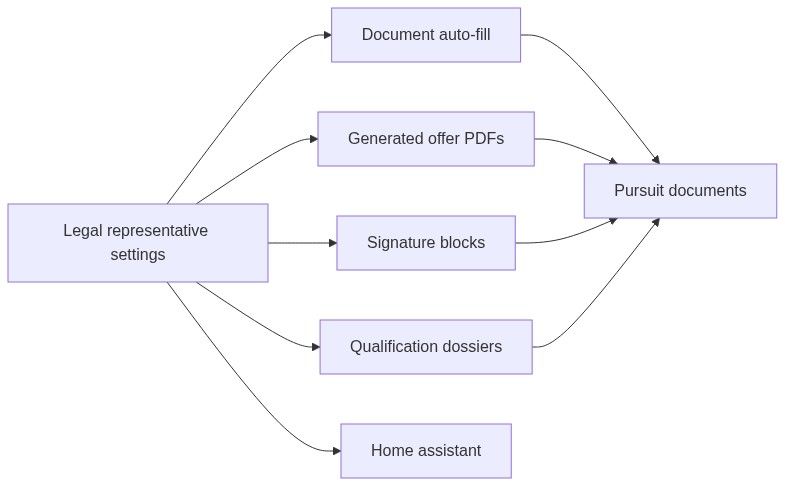
Legal rep vs company profile
Both must describe the same bidding organization context.
Workflow: first-time setup
Gather ID scan and proof of domicile
Open Team → Settings → Legal representative
Click cog or any group
Fill Identity, Identification document, and Residence in one pass
Save changes
Verify read view shows all three groups
Complete checklist with profile and banking
Workflow: ID renewal
Note pursuits with deadlines after old expiry date
Update document dates and numbers in sheet
Save before regenerating qualification PDFs
Attach new ID scan in pursuit documents module
Permissions
Edge cases
What you cannot do
Store multiple signatories in this section
Upload ID image here (attach in pursuit documents)
Set per-pursuit signatory in team settings
Auto-validate CNP or passport checksum in UI
Best practices
Complete identity, document, and residence in one save
Match document details exactly to physical ID
Update expiry before active pursuit deadlines
Align legal capacity with power-of-attorney wording
Re-read generated signature block after any edit
FAQ
Why is ID hidden on read view?
Residence empty — fill domicile fields.
Is issuer used if not shown?
Yes — in document generation.
Can collaborator edit legal rep?
Typically yes if they can edit settings.
Romanian CNP required?
Enter if your ID card has one and forms ask for it.
Troubleshooting
Related articles
Team settings
Company profile
Banking information
Team entity
Pursuit documents