Team name
Overview
The team name is the display label for your workspace — shown in the team switcher, pursuit context, settings page title, and team-specific navigation. It is the first section on Team settings.
The team name is an internal workspace label. It can differ from your legal company name — e.g. "Public tenders team" for a division bidding on behalf of ACME SRL. Legal identifiers belong in Company profile.
Tip: Before you rename, confirm:
Colleagues will recognize the new name in the team switcher
You are not trying to change VAT or legal name (use company profile)
You have owner or administrator permission if editing an existing team
Client-facing teams use client-approved labels when consulting
Important: Renaming does not change pursuit links, team key, or historical records — only display text updates.
Team name vs company profile
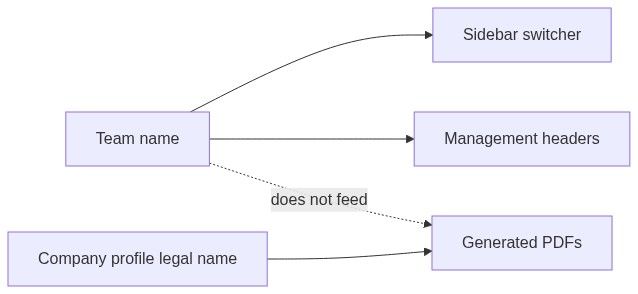
Where the team name appears
Changing the name updates these immediately after save. Fiscal identifiers and bank data are unchanged.
How to open
Team name is the first section in the settings grid (before Company profile).
During Create team, you set the initial name in wizard step Overview.
Layout — read view
Section header
Field list
Single row with primary-colored left border:
The read row is not clickable — editing happens only through the cog icon (unlike company profile rows).
How to edit
Click the gear icon at the top-left of the Team name section
The Update team name sheet slides in from the right
Change the name; Save changes
There is no click-to-edit on the displayed name row.
Edit sheet — Update team name
Form field
Footer buttons
Outcomes
Saving is immediate for the whole team.
Permissions
Without update permission, the cog icon is hidden and the name is read-only.
Collaborators typically see but cannot rename.
When to rename
Edge cases
What you cannot do
Rename from team switcher inline (must open settings)
Set different display names per user
Change team key or pursuit URLs by renaming
Put VAT number in team name field (use company profile)
Best practices
Use a name colleagues recognize in the switcher
Keep legal identifiers in Company profile
Rename after mergers only when the whole team agrees
For multi-entity users, include entity hint in name ("ACME — EU unit")
Match name used in internal runbooks and standup docs
FAQ
Is team name the same as legal name?
No. Legal name lives in Company profile.
Does renaming affect pursuits?
No. Pursuits stay linked to the same team key.
Can two teams share a name?
Yes across accounts; within your list, distinct names reduce confusion.
Who sets name on create team?
You — in wizard step Overview; you become owner.
Can assistant rename the team?
Possible via tools — verify on settings read view afterward.
Troubleshooting
Related articles
Team settings
Company profile
Create team
Team overview
Delete team
Team entity