Notice participants
Overview
The Participants tab lists organizations associated with a notice — bidders, consortium members, and (after award) winners. Use it for competitor research, gauging market interest before you commit pursuit resources, and validating whether your organization appears correctly in public records.
Participant data is read-only and comes from official award or submission publications. Tendersight reflects what the source discloses; some jurisdictions publish only the winner, not the full bidder list.
Tip: Before you rely on participant data for pricing strategy, confirm:
You are signed in (guests do not see this tab)
Notice status is appropriate — full lists often appear after award or specific publication phases
You clicked through to Company profiles and verified fiscal identifier (names can collide)
You distinguished consortium rows from single-company bidders via the Leader column
Important: Low or zero participant count on an ongoing tender does not mean low competition — many procedures do not publish names until after submission or award.
How participants fit in market intelligence

See Company (market intelligence) for how market companies differ from your team entity.
How to open the Participants tab
Path A — Tab navigation
Open a notice detail page (signed in).
Click Participants in the tab bar.
The tab is disabled when participant count is zero — you cannot open an empty participants view from navigation.
Path B — From overview preview
On Notice overview, scroll to Participants (signed-in only).
Click View all to open the full tab.
Access requirements
Plan competitor research after Awarded publications when participant lists most often populate. Pre-award, the overview Competition count may show a number without names.
Page layout
Shared notice chrome: command bar, tab navigation, obsolete-version banner when applicable.
Main content: table with sticky header (same table pattern as other list pages in the product — ).
Table columns
Rows represent single legal entities and consortium members grouped logically in source data.
Pagination
When participant count exceeds one page:
Use pagination controls at the bottom of the table.
Page change loads the next slice.
Row numbers restart per page (# column).
Loading states
Consortium vs single bidder
When researching a consortium, open the Leader company profile first, then member rows. Company connections may reveal recurring teaming partners.
Research workflow
Open an awarded notice (or post-submission publication when lists publish).
Go to Participants tab.
For each relevant row, click Company link.
On company profile, review win rate, main competitors, and authority embeddedness.
Optional: explore company tenders list for overlapping CPV history.
Feed insights into bid/no-bid, pricing, and teaming decisions on your pursuit.
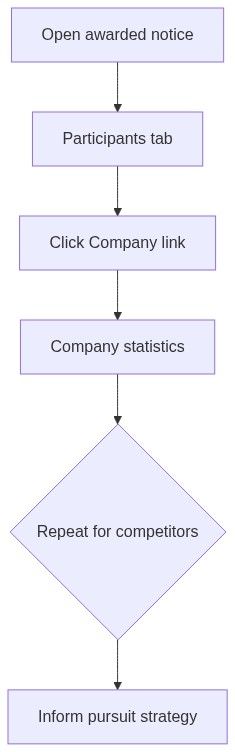
For ongoing notices, use participant count on overview decision band as a coarse competition signal even when names are not yet public.
Privacy and data source
Tendersight does not supplement participant lists with proprietary bidder intelligence beyond linked analytics.
Link to analytics
The Company column opens:
Companies directory
Company statistics
Company tenders
Always verify fiscal identifier on the profile when multiple companies share similar trade names.
What you can and cannot do
You can
Browse paginated participant rows (signed in)
Jump to market company profiles
Cross-reference with overview competition count
You cannot
Add or remove participants manually
Export the table as dedicated CSV from this tab (copy from browser if needed)
See participants as a guest
Open the tab when count is zero
Troubleshooting
FAQ
Why is the Participants tab disabled?
Participant count is zero in Tendersight for this notice — typical before award or when the jurisdiction does not disclose bidders.
Can I export the participant list?
No dedicated export on this tab. Copy from the browser or record notes in your pursuit.
Do participants include our company if we submitted a bid?
Yes, when your organization appears in source data under a fiscal identifier that matches the linked market company record.
Is participant data real-time?
It updates on Tendersight's sync schedule from official sources, not live portal polling.
Why does overview show a competition number but the tab is disabled?
Count may be known from metadata before full name lists are indexed or published to the detail API.
Can I see lot-level winners here?
Some procedures publish winners per lot in source documents. The table reflects notice-level participant indexing; cross-check Notice lots and PDFs for lot-specific outcomes.
Related articles
Notice overview
Notice lots
Company (market intelligence)
Companies directory
Company statistics
Notice (Tender)