Create pursuit from notice
Overview
Creating a pursuit from a notice links your team's bid workspace to an official procurement opportunity in Tendersight's catalog. At creation, title, deadline, estimated value, country, CPV, and contracting authority copy from the notice as a snapshot. Your team then works independently — questionnaire, offers, documents, and checklists live in the pursuit, not on the read-only notice.
This is Path A in the pursuit lifecycle: recommended whenever the tender appears under Opportunities → Notices or arrived via an alert. The result is the same workspace you would get from a standalone pursuit, but with richer starting context and ongoing access to notice documents and version history.
Tip: Before you click Create pursuit, confirm you have:
Opened the latest version of the notice (not an obsolete amendment)
Reviewed submission deadline, estimated value, and lots
Checked that tender documents are available (or that you have PDFs elsewhere)
Completed Team → Settings — company profile, legal representative, and banking
Selected the correct active team if you belong to more than one
Verified your plan has room for another pursuit
The more accurately you evaluate the notice up front, the smoother pursuit setup and compliance work will be later.
Important: A pursuit created on an older notice version does not auto-migrate when the authority publishes an amendment. Re-read the Versions timeline, fetch new documents, and update your questionnaire and offers manually.
Notice-linked pursuit vs standalone
See Create standalone pursuit when the opportunity is not in the catalog.
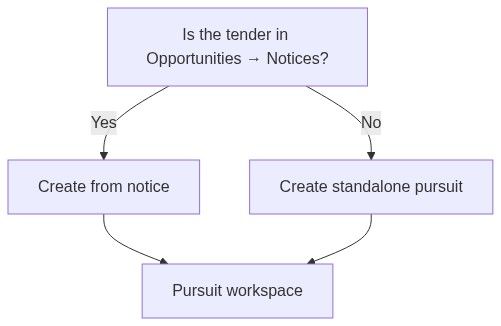
Caution: Choosing standalone when the notice is indexed means you lose automatic version tracking and one-click Go to pursuit from the notice page.
Prerequisites
Before you start:
How to start — entry points
Button label behavior
Tendersight remembers which teams already linked a pursuit to each notice, so you are never asked to create duplicates for the same team.
Creation flow — numbered steps
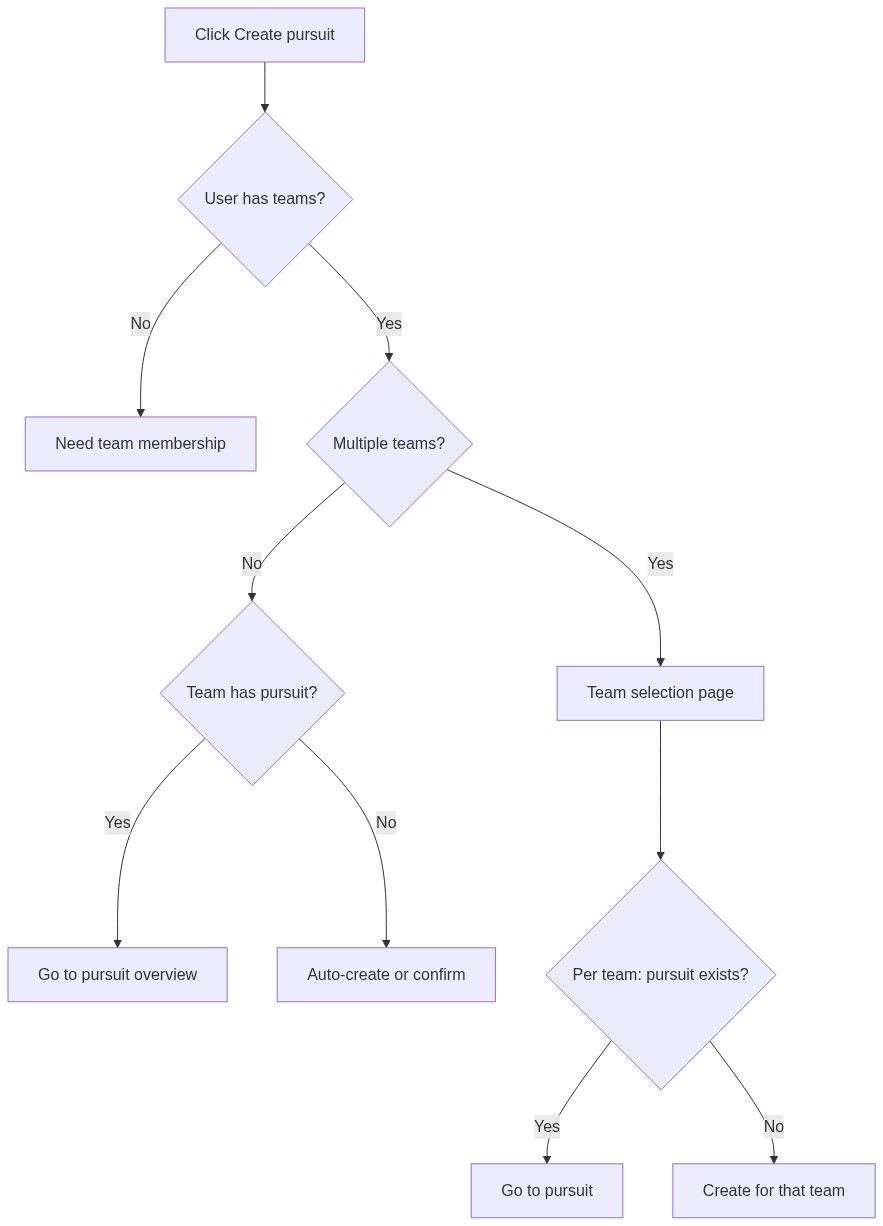
Single team, no existing pursuit
Open the notice from Opportunities → Notices, an alert, or assistant search.
Confirm you are on the latest version (resolve any obsolete-version banner first).
Click Create pursuit in the command bar.
If eligible, the system may auto-create immediately — loading indicator: "Creating pursuit…"
You land on Pursuit overview; the card appears on Team → Pursuits in Active.
Team already has a pursuit on this notice
Open the notice.
Click Go to pursuit (not Create).
You land on your team's existing workspace — no duplicate is created.
Multiple teams
1. Click Create pursuit on the notice.
2. On the team selection page, review Create a pursuit / Existing pursuits sections.
3. Each row shows team avatar + name. Current team labeled "Current team".
4. Per team:
- Pursuit exists → Go to pursuit (play icon) or click row
- No pursuit → Create pursuit (folder-plus icon)
5. After creation or navigation, you land on Pursuit overview for that team.
No teams on your account
Message: "You need to be part of a team to create a pursuit."
Accept an invitation or create a team first.
What gets copied from the notice
At creation, pursuit context inherits a snapshot:
You refine these later on Pursuit overview and context modules. Country and type drive dynamic pursuit navigation via country profiles — wrong values early on mean wrong sidebar modules.
What does not copy automatically
After creation
You land on Pursuit overview for the new workspace.
The pursuit appears on Team → Pursuits kanban in the Active column.
Team overview checklist marks Start a pursuit complete.
Notice overview button switches to Go to pursuit for your team.
Recommended next steps

Confirm pursuit type and country on overview.
Run In-depth analysis on notice/tender documents.
Review extracted requirements on Questionnaire.
Configure SME assignments if not already done.
Follow First pursuit workflow through submission.
One pursuit per team per notice
Each team gets at most one pursuit per notice.
Notice X├── Team A → Pursuit 1├── Team B → Pursuit 2└── Team C → (none yet)Data does not merge across teams — separate workspaces, separate compliance work, separate pricing.
Permissions and plan limits
Errors and edge cases
What you can and cannot do
You can
Create one pursuit per team per notice
Open notice documents from the linked notice while working in the pursuit
Copy notice reference and share pursuit links with teammates
Refine copied fields on pursuit overview
You cannot
Create two pursuits for the same team on the same notice
Edit notice title or deadline from inside the pursuit
Merge a later-created standalone pursuit onto this notice
Force notice sync — updates arrive on Tendersight's schedule
FAQ
Can two colleagues on the same team create duplicate pursuits?
No. The second attempt routes to the existing pursuit (Go to pursuit).
Does creating a pursuit subscribe me to notice updates?
No. Notice version timeline and Alerts are separate — configure alert rules if you want email digests.
Can I create from a notice without completing team settings?
Technically possible in some flows, but document generation will lack legal data — complete settings first.
What happens if the authority amends the tender after I created a pursuit?
The notice updates on sync; your pursuit does not auto-update. Review Versions timeline, fetch new documents, and adjust bid content.
Why does another team see Create pursuit while I see Go to pursuit?
Pursuit existence is per team. Your team has a workspace; theirs may not.
Will my pursuit disappear if the notice is cancelled?
No. Your workspace remains. Evaluate whether to archive or delete the pursuit manually.
Can I change which notice a pursuit links to?
No. Create a new notice-linked pursuit if you started on the wrong publication.
Troubleshooting
Related articles
Notice overview
Notice (Tender)
Pursuit
Pursuits list
Create standalone pursuit
Company profile
Team settings
First pursuit workflow